Skip to content

Get 15% OFF your first orderOrder now

24/7 supportConfidential & plagiarism-free

Category: Uncategorized

  • Research Paper Cover Page: APA Title Page Setup and Template

    A strong research paper cover page tells the reader who wrote the paper, what it is about, and where it belongs before they read a single sentence. In the APA 7th edition, the title page is the first page of every paper, so it is worth getting right the first time.

    This guide shows you the exact title page setup for student and professional papers, with a copyable template, a clean page example, and a checklist. You will also see how MLA handles the same job.

    Key takeaways

    • One page, two names: a research paper cover page in APA is called the APA title page. APA 7 requires it for every paper, so you cannot skip it.
    • Pick the right version: use the student title page for class work and the professional version for journal submissions. Using the wrong one is a common reason for lost marks.
    • Student extras: the student version adds the course number, the instructor name, and the due date. These details help your marker file and grade the paper.
    • Professional extras: the professional version adds a running head and an author note. The note carries ORCID iDs, disclosures, and the corresponding author.
    • Stay consistent: use the same font and double spacing on the title page as in the rest of the paper. A mismatch makes the first page look careless.
    On this page
    1. What is a research paper cover page?
    2. APA title page format
    3. Title page setup, step by step
    4. Template and page example
    5. APA style vs MLA
    6. Research paper format and table of contents
    7. Common mistakes and checklist
    8. FAQs

    What is a research paper cover page?

    A research paper cover page is the opening page that identifies your work. It lists the paper title, the author, and the institution, and it sets the tone for the rest of the research paper format.

    • Purpose: a research paper cover page names the paper, the author names, and the school or journal. A marker or editor can then file the paper correctly and find the details they need without reading the text.
    • Where it sits: the page is the first page of the paper, and it carries page number 1 in the header. The abstract or main text then begins on a fresh page after a page break.
    • Who needs it: APA requires a title page for every paper, while many MLA papers use a short heading instead of a separate page. Check your course style before you format any research paper cover page, because the two styles handle page one very differently.
    • Typical elements: paper title, author’s name, affiliation, course details, and a due date for a student paper. Professional papers swap the course details for a running head and an author note.

    Cover page, title page, and cover sheet: are they the same?

    In everyday use the three names point to the same thing. In APA, the official name is the title page.

    • Cover page: the common name students use for a research paper cover page, and the term most assignment briefs choose. An apa cover page is simply the APA title page, so the two phrases describe the same layout.
    • Cover sheet: a form some universities attach in front of the paper, often with an honor statement or a submission checklist. It is not part of the APA title page, so keep it separate and place it in front when your department asks for it.
    • Cover letter: a separate letter sent to a journal editor when you submit a manuscript. It introduces your work and never replaces the title page, which still opens the manuscript file.

    Search phrases students use for the same page

    You will see many names for this page online. They all lead back to the same layout.

    • Front page: a research paper front page, a research paper front page format, or a research paper front page sample. These searches usually want the same single page that shows the title and author details.
    • Sample searches: a cover page research paper, a title page sample research paper, a sample paper cover page, a paper cover page example, or a cover page for a research paper example. The template and page example for this research paper cover page answer all of them.
    • Project types: a research project title page, a research proposal front page, a scientific paper title page, or a science report title page. The core elements stay the same, but a proposal may add a supervisor name and a submission date.
    • How-to searches: how to make a front page for research, how to make title page for research paper, and how to create title page for research paper. The step-by-step section below walks you through each action in your word processor.

    APA title page format: student and professional versions

    The APA Publication Manual gives two versions of the APA title page. Pick the version that matches your situation, then follow the title page guide your instructor or journal supplies.

    Both versions use a centered title, double spacing, one-inch margins, and a readable font such as 12-point Times New Roman or 11-point Calibri.

    Student title page: the student version for a student paper

    The student version is built for class papers, theses, and dissertations. The student title page includes the items below, in this order.

    • Paper title: bold, in title case, centered, and placed three or four lines below the top margin. Keep it focused and specific so the reader knows the subject at a glance.
    • Author names: one blank line below the title, written as first name, middle initial, and last name. Do not add titles such as Mr or Ms, and leave out degrees.
    • Affiliation: the department and institution where the work was done, such as Department of Psychology, State University. This tells the reader where the research belongs.
    • Course: the course number and course name, written like PSY 201: Research Methods. Use the exact wording from your syllabus so the marker matches it quickly.
    • Instructor name: use the title and spelling your instructor prefers, such as Dr. or Professor. If you are unsure, check the syllabus or the course page.
    • Due date: the assignment due date, written as month, day, and year. Use the date on the assignment brief, not the day you finished writing.

    Student papers do not need a running head unless your instructor asks for one. They still show the page number in the top right corner of every page, including the title page.

    Professional title page: the professional version

    The professional version is meant for papers you submit to a journal or share as a professional paper. This APA title page includes more identifying detail.

    • Professional title: a concise, informative title in bold title case, centered in the upper half of the page. Editors use it to judge fit, so make it clear and specific.
    • Author names and affiliations: each author with the department and institution where the work was done. Use a superscript numeral when authors have different affiliations, and match the numeral to the affiliation line below.
    • Running head: a short running title in capital letters, flush left in the page header, with the page number flush right. It repeats on every page so reviewers can identify the manuscript.
    • Author note: placed in the bottom half of the page, with ORCID iDs, changes of affiliation, a disclosure, an acknowledgment, and contact details for the corresponding author. Each part gets its own short paragraph.
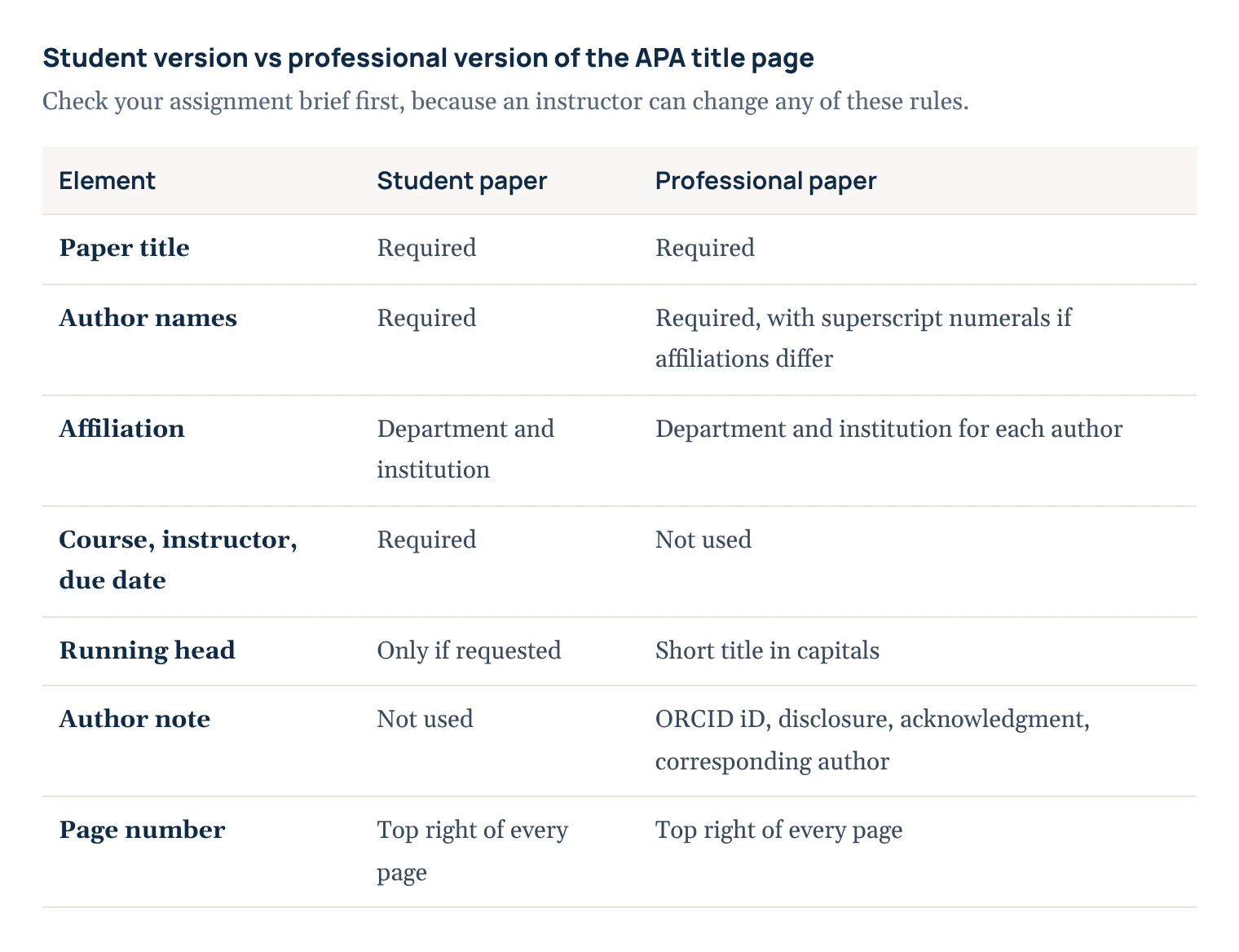
    Research paper cover page comparison of APA student and professional title page elements
    Student and professional title pages share a core, then split on course details, running head and author note.

    Title page setup, step by step

    Follow this short process to set up your research paper cover page in your word processor. It works in Word, Google Docs, and LibreOffice, and it keeps the apa 7th edition rules intact.

    1. Set the page. Use one-inch margins, double spacing, and one readable font for the whole paper, including the title page.
    2. Add the page header. Insert the page number at the top right. Add a running head at the top left only for a professional paper or on request.
    3. Type the paper title. Center it, make it bold, and use title case, three or four lines down from the top.
    4. Add the author names. Skip one line, then type each author in the order they appear in the byline.
    5. Add the affiliation. Write the department and institution under the author names. Add a superscript numeral if affiliations differ.
    6. Finish with course details. For a student paper, add the course number, course name, instructor name, and due date, each on its own line.
    7. Check and export. Read the page against the checklist below, then save it in PDF format if your instructor asks for a PDF.
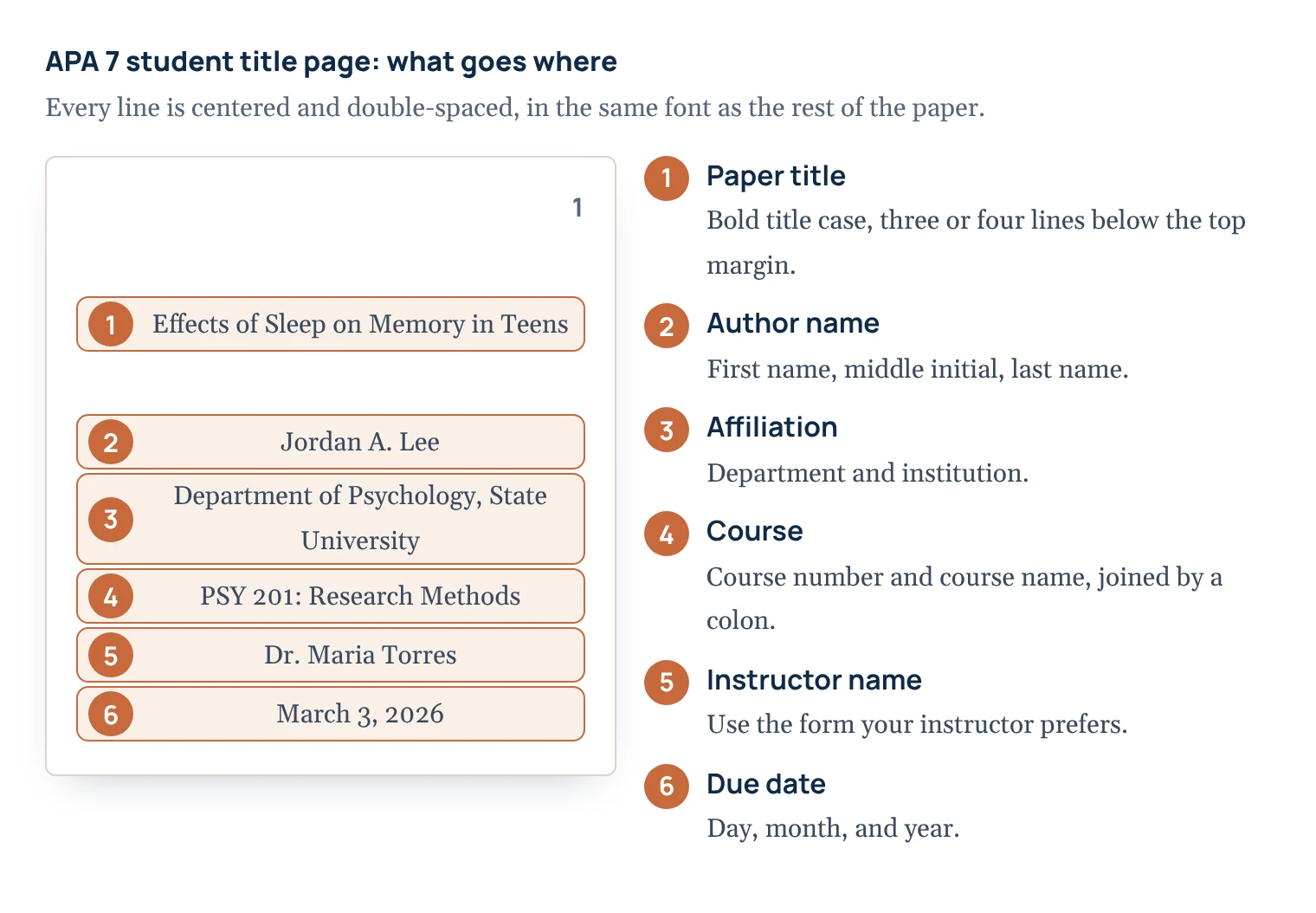
    Research paper cover page example showing an APA 7 student title page with six numbered elements
    Research paper cover page example: the six elements of an APA 7 student title page.

    Page header and page number

    On every APA title page, the page header controls the page number and, when needed, the running head.

    • Header of all pages: the page number sits in the top right of every page, starting on the title page. Use your word processor’s automatic page number, never typed numbers.
    • Running head: include it only for a professional paper, or when your instructor requests it for a student paper. Adding it by habit to class work is a frequent mistake.
    • Running title length: keep it to a short version of the paper title, in capital letters, at 50 characters or fewer. Count spaces and punctuation as characters.

    Paper title and institutional affiliation

    These two lines do most of the identifying work, so write them carefully.

    • Paper title: focused and specific, with no abbreviations and no unneeded words such as “A Study of”. Name the main variables and the group studied when you can, so your research paper cover page promises what the paper delivers.
    • Title case: capitalize the first word, the last word, and all major words. Lowercase short articles, conjunctions, and prepositions of three letters or fewer, unless they start the title.
    • Institutional affiliation: name the department and institution, in that order, with a comma between them. Spell out the full names rather than using short forms or logos.
    • Author affiliation changes: if an author has moved, give the original affiliation on the page and the new one in the author note. This credits the place where the work was actually done.

    Author note and disclosure for a professional paper

    The author note appears only on a professional title page. It sits in the bottom half of the page and uses short paragraphs.

    • ORCID: give each author’s ORCID iD with a link, if the author has one. The iD links the paper to the researcher’s other work and avoids name confusion.
    • Disclosure: state any conflict of interest, and name the funding source if there is one. If there is nothing to disclose, many journals still want a short statement saying so.
    • Acknowledgment: thank the people or groups who helped but are not authors, such as lab staff, statisticians, or a funder. Keep it brief and factual.
    • Corresponding author: give the name and email address of the author who will handle questions from editors and readers. Use an address that will stay active after publication.

    Research paper cover page template and page example

    A template saves time, and a good page example shows you what finished work looks like. Copy the template, then replace each highlighted part of your research paper cover page.

    Template: APA student title page

    [Paper Title in Bold Title Case]
    [First Name Middle Initial Last Name]
    [Department of …, Institution]
    [Course number: Course name]
    [Instructor name]
    [Month Day, Year]

    Template: APA professional title page

    [RUNNING TITLE IN CAPITALS] (left of header) [Page number] (right of header)
    [Paper Title in Bold Title Case]
    [Author One¹ and Author Two²]
    [¹Department, Institution; ²Department, Institution]
    [Author note: ORCID iDs, disclosure, acknowledgment, corresponding author]

    Paper title

    Weak

    “A Study of Sleep”

    Too broad, with no group, no measure, and a filler phrase.

    Strong

    “Effects of Sleep Duration on Memory Recall in Adolescents”

    Specific, short, and written in title case.

    How to build a page for a research paper in Word

    Use these quick actions to create a page for a research paper that stays consistent.

    • Styles: set the Normal style to your font and double spacing, then reuse it on every page. This one change keeps the title page and body text perfectly matched.
    • Header tools: use Insert, then Page Number, then Top of Page, then Plain Number 3 for the page number on the right. For a running head, double-click the header and type it flush left.
    • Page break: end the title page with a page break so the abstract or text starts on a fresh page. Pressing Enter many times instead of a break moves the layout when you edit.
    • Export: use Save As, then PDF, so the layout stays fixed on every device. Many instructors want the final PDF format, so check the submission rules first.

    APA style vs MLA: how the formats differ

    APA style uses a separate title page. MLA keeps things lighter, so you should check which style your class follows.

    • APA format: a full APA title page, a page number in the header, and a title repeated on the first page of text. The paper then follows with the abstract, body, and references.
    • MLA: no cover page by default. You place your name, your instructor’s name, the course, and the date at the top of page one, then center the title below them.
    • MLA header: your last name and the page number sit in the top right of every page. This replaces the APA running head and keeps the layout simple.
    • When MLA needs a cover page: only when the instructor asks. In that case, center the title, then list your name, course, instructor, and date, each on its own line.

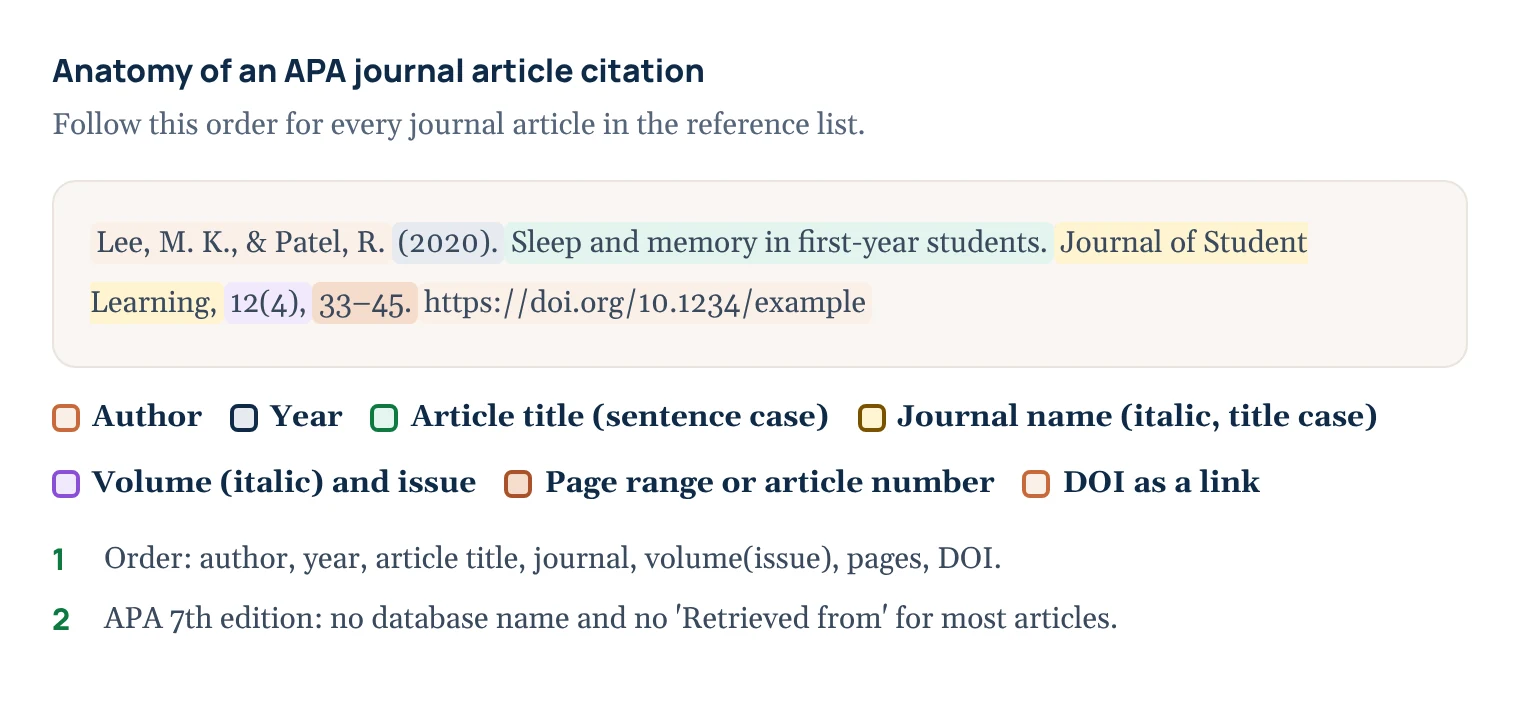
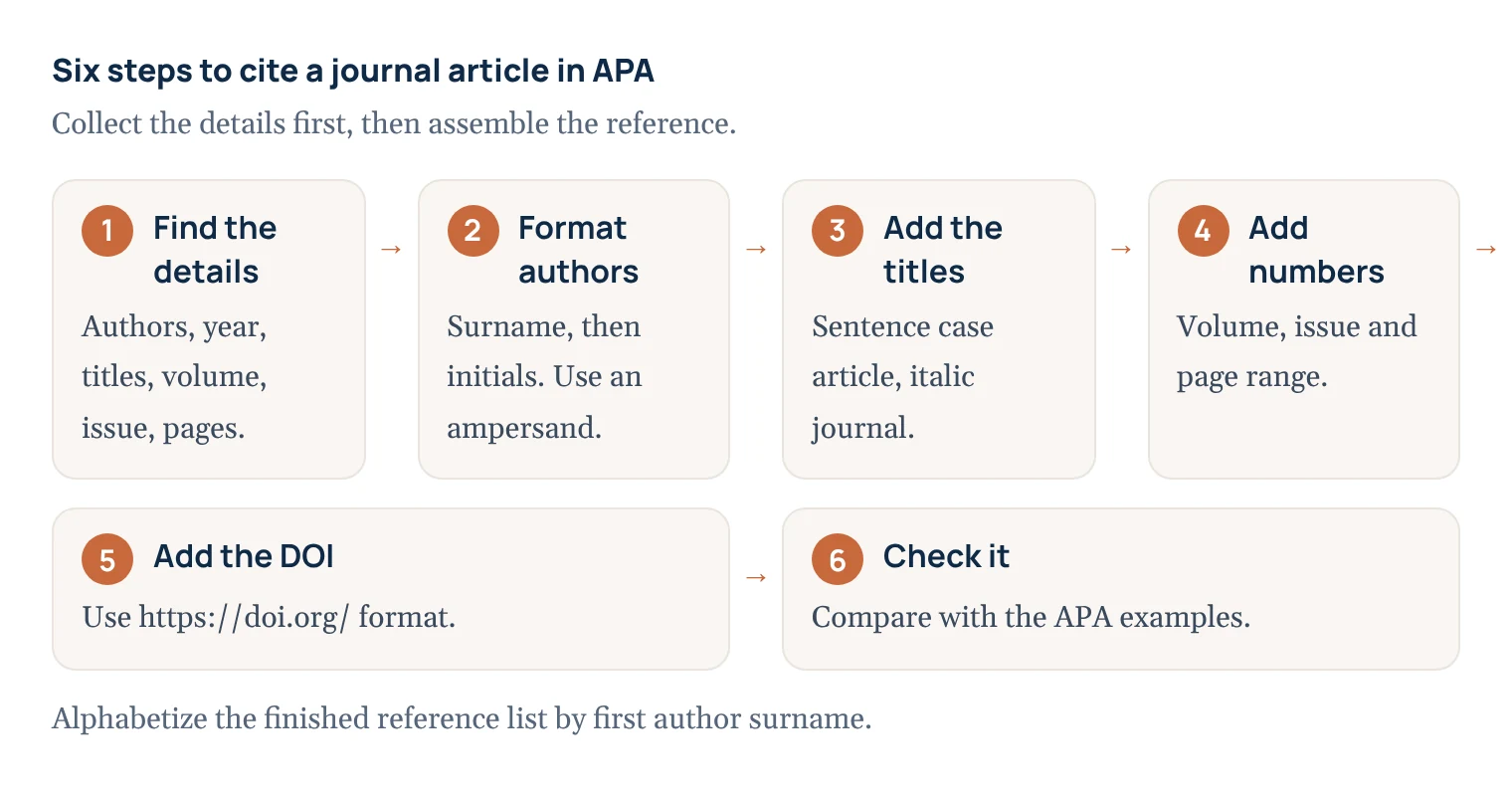
    If your course uses citations, see our guide to APA journal article citation for the reference list that follows the title page.

    Research paper format and table of contents

    The cover page is only the first piece. A complete research paper format has several required elements in a fixed order.

    • Title page: the first page, as set up above in your research paper cover page. It carries page number 1 and none of the body text.
    • Abstract: a short summary on its own page, when your instructor or journal asks for one. It usually runs 150 to 250 words and states the question, method, and main finding.
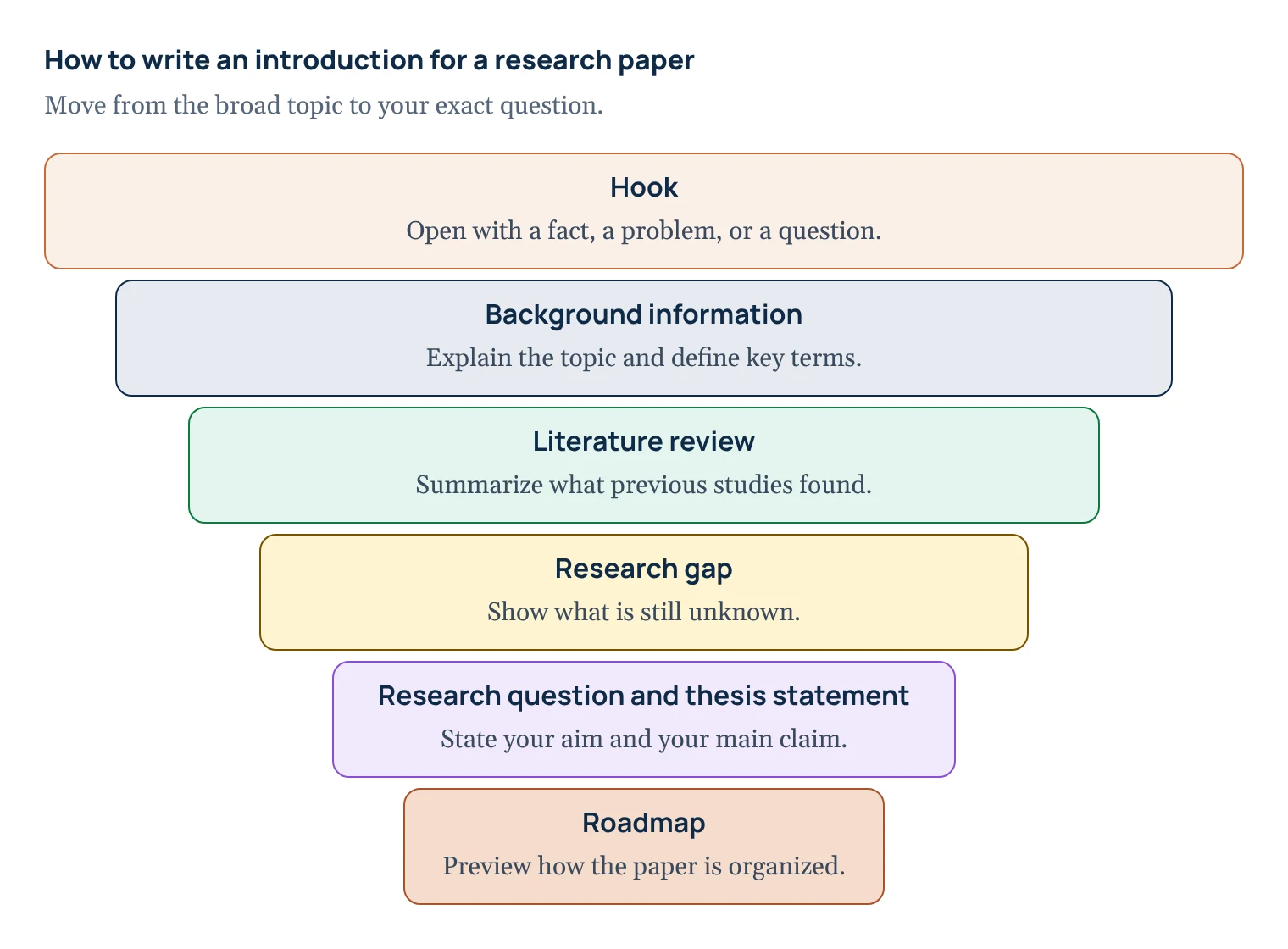
    • Main text: introduction, methods, results, and discussion. Our guide on how to write an introduction for a research paper shows how to open it, and the later sections follow your outline.
    • References: the reference list starts on a new page and lists every source you cited. Use a hanging indent and alphabetical order.
    • Table of contents: add one for a thesis, dissertation, or long report. A short class paper usually does not need it, but long pages for research papers benefit from clear navigation.

    Names and affiliations in longer work

    Longer documents need consistent names and affiliations from page to page.

    • Names and affiliations: use the same spelling of names and affiliations on the title page, the abstract, and any submission form. Mismatches cause indexing errors after publication.
    • Department and institution: write them in full on the first mention, then keep the same form. Avoid switching between short names and full names.
    • Two authors: join the two author names with “and”. For three or more, use commas and add “and” before the last name, keeping the order agreed by the team.

    When you plan to submit the work to a journal, read how to write a journal article before you finalize the professional paper.

    Common mistakes and a final checklist

    Small slips on your research paper cover page create a poor first impression. Use this list before you hand the paper in.

    • Wrong version: using the professional APA title page for a class paper, or the student title page for a journal submission. Confirm the version before you start formatting the research paper cover page.
    • Missing required elements: leaving out the due date, the course number, or the instructor name on a student paper. Tick each item on the checklist before you submit your research paper cover page.
    • Style drift: mixing fonts, single spacing, or a left-aligned title instead of a centered title. These small changes make the paper look rushed.
    • Misused header: adding a running head to a student paper when nobody asked for it. It is harmless but shows you used the wrong version.
    • Title errors: writing the title in all capitals instead of title case, or leaving the bold off. Both break the APA 7 look of the page.

    The Purdue Online Writing Lab explains the layout visually, and its APA general format guide shows both a student and a professional page example.

    For the full rule set, the Publication Manual remains the main reference. Its title page guide for students is also free to download.

    1. Pick the versionStudent or professional
    2. Set the headerPage number, running head
    3. Type the elementsTitle, author, affiliation
    4. Check and exportPDF format if asked

    FAQs about the research paper cover page

    How to do a cover page for a research paper?

    Start with the style your class uses. In APA, center the paper title in bold title case, three or four lines from the top. Add your name, your department and institution, the course number and name, your instructor’s name, and the due date, each on its own line. Put the page number in the top right of the header, keep double spacing, and use the same font as the rest of the paper. Finish the page with a page break so the text starts on page two.

    Does APA 7 use a cover page?

    Yes. APA 7 requires a title page for every paper, and it is often called the apa cover page. Students use the student version, which includes course details and the due date. Professionals use the professional version, which adds a running head and an author note. Student papers do not need a running head unless the instructor asks, but every page carries the page number in the top right corner. Always follow any extra instructions from your instructor.

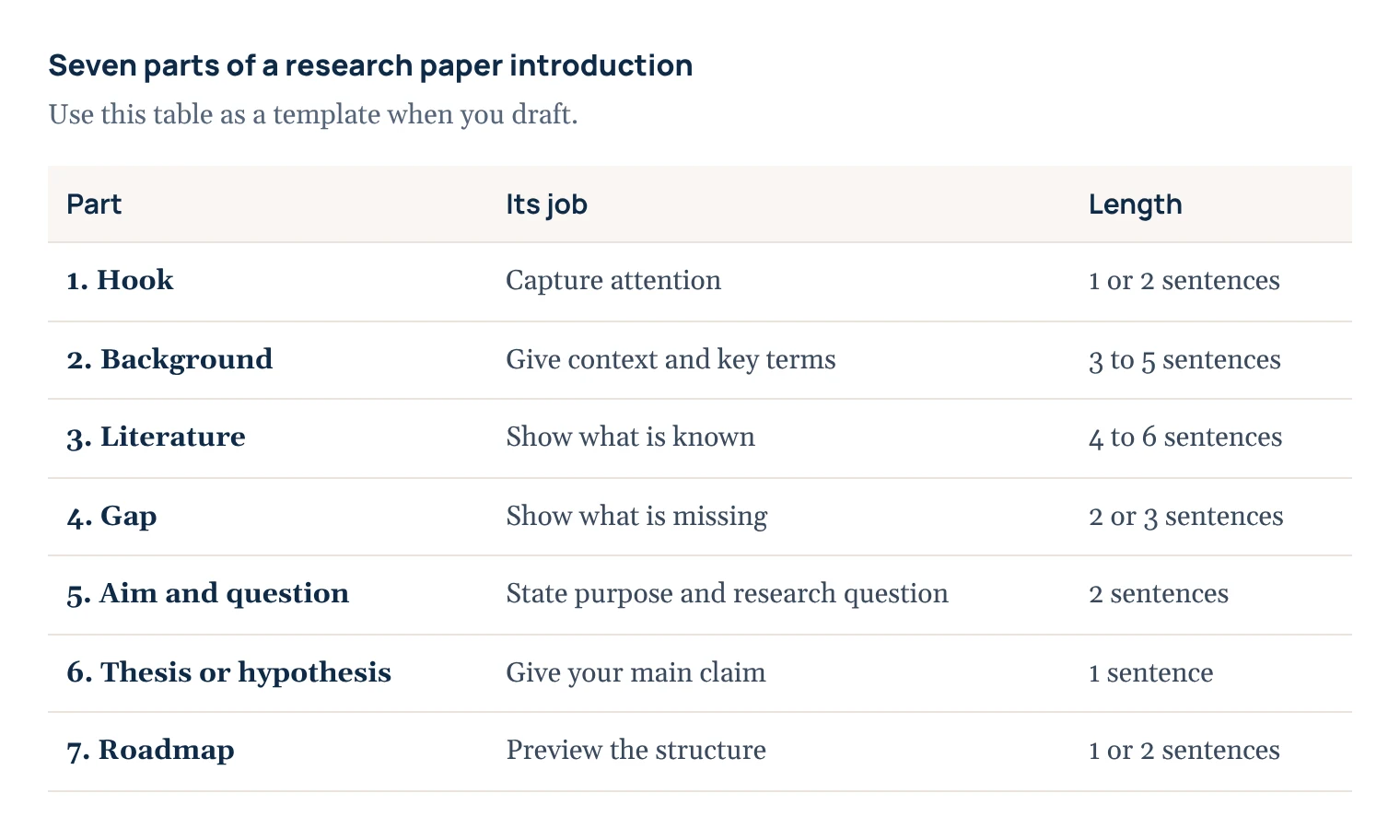
    What are the 7 parts of a research paper?

    A common seven-part structure includes the title page, the abstract, the introduction, the methods, the results, the discussion, and the references. Some papers add a table of contents, appendices, or an acknowledgment. Length and order can change by field, so check your assignment or the journal’s author guidelines. The title page comes first and introduces the work, while the reference list closes the paper and lets readers find every source you used.

    What is the proper format for a cover page?

    The proper format depends on the style guide. For APA 7, use a centered bold title in title case, then author names, affiliation, course number and name, instructor name, and due date. Use double spacing, one-inch margins, and a readable 11- or 12-point font. Put the page number at the top right. For MLA, skip the cover page unless your instructor asks, and use the heading on page one instead. When in doubt, ask your instructor or follow the assignment brief.
  • Is Gov a Scholarly Source? A Guide to Government Documents

    Is gov a scholarly source? Usually the honest answer is “sometimes”, because a .gov address tells you who published a page, not whether experts reviewed it. Government websites are authoritative and credible for many topics, yet many are not scholarly.

    This guide shows you how to judge government documents, when they count as a scholarly source, and how to cite them. It follows the way a library guide at a university would teach the same skill.

    Key takeaways

    • Is gov a scholarly source? Only some government publications are, mainly those that are peer-reviewed. A .gov address shows who published a page, but it does not prove that experts reviewed it. So when someone asks whether gov is a scholarly source, the careful answer is that it depends on the document.
    • Government information is often authoritative and credible, even when it is not scholarly. That is why you should treat official facts as strong background and keep scholarly journals for your main argument.
    • Always evaluate the agency, the authors, the date, and any review process. Running these four checks on every document takes only a few minutes and protects your grade. Each check helps you decide whether a government document is a scholarly source or only a reliable fact page.
    • Ask your instructor or a librarian whether your assignment accepts government sources. Rules differ between courses, so a short email can settle the question before you write. Ask this before you decide whether gov is a scholarly source for that assignment.
    On this page
    1. Is gov a scholarly source?
    2. What counts as a scholarly source
    3. When government documents are scholarly
    4. How to evaluate government information
    5. How to find and cite government sources
    6. Government agencies and what they publish
    7. Common mistakes and checklist
    8. FAQs

    Is gov a scholarly source? The short answer

    A .gov website is run by a government body in the United States, so the information is official. Official is not the same as scholarly, and that difference matters for academic work.

    • Is .gov a scholarly source: a .gov page is usually authoritative, but it is rarely a scholarly source on its own. Official does not mean peer reviewed, so look for a named author and a review statement before you call the page scholarly.
    • Is .gov a credible source: yes in most cases, because a government agency stands behind the information. Think of credibility as trust in the publisher and scholarly status as proof of expert review. The two overlap often, but not always.
    • Are government websites scholarly sources: some are, such as an agency’s peer-reviewed journal, but most pages are written for the public. Look for the word journal or an editorial board on the agency page. If you find neither, treat the page as public information.
    • Is gov a credible source for statistics: yes. Federal government data on population, health, and the economy is usually the best available. Numbers such as population counts and health rates come straight from the agency that collected them, so cite that agency and the table title.

    Scholarly source vs authoritative source

    These two labels describe different things, and many students mix them up.

    • Scholarly: written by experts for other experts, usually reviewed by peers before it appears in a scholarly journal. A scholarly article usually shows its authors, their credentials, a method section, and a long reference list. A government document must meet these tests before it is a scholarly source.
    • Authoritative: backed by a reputable body with real expertise, even when no peer review took place. An authoritative source can still be non-scholarly, so use it for facts, definitions, and context rather than for original arguments.
    • Authoritative and credible: the label that fits most gov sites, such as pages on health, law, or statistics. These pages are excellent for background information, laws, and statistics, and they are accepted in many assignments.
    • Non-scholarly: quick facts, news releases, and public guides that educate readers but do not report original research. They are written for the public, so they rarely include methods, citations, or the technical depth that scholarly work needs.

    What counts as a scholarly source

    Scholarly articles share a handful of features. Knowing them lets you place any government publication on the map.

    • Written by experts: the authors are scholars with a named credential and an affiliation, often a university or research institute. Search the author’s name to confirm that they work in the field they are writing about.
    • Peer review: other experts review the work before a journal publishes it. See our guide on how to tell if an article is peer reviewed for the exact checks. Peer review adds an independent check, which is why instructors prefer it for key evidence.
    • Citations: a reference list or footnote trail lets readers check every claim. Follow a few of the cited sources to confirm that they exist and that they support the claim.
    • Technical language: the writing assumes subject knowledge and uses precise terms. Heavy jargon is not proof of quality, but it signals that the audience is other experts and not the general public.
    • Publisher: a university press, a scholarly society, or a reputable publisher issues the work, not a predatory outlet. Check the publisher’s About page, because predatory journals often hide behind official-sounding names.

    Peer-reviewed sources and the scholarly journal

    A scholarly journal or academic journal is the standard home for peer-reviewed sources. A journal article in such a journal has passed review by experts in the field.

    • Scholarship: original research, published for other scholars to test and extend. When a paper reports a new experiment or a new analysis, it counts as original scholarship that others can test.
    • Peer-reviewed journal: check the journal’s editorial page for its review policy. Many journals state the policy in a short section called About the journal or Instructions for authors. If the journal is peer reviewed, a government article inside it is a scholarly source.
    • Non-journal sources: books, reports, and websites can be reliable, but they are non-journal and need extra checks. A book from a university press may be scholarly, but a blog or a news story with the same facts is not.
    • Review articles: a literature review summarizes many studies and counts as a scholarly work when it appears in a journal. Check that the review itself cites many studies, because a thin review adds little evidence to your paper.

    When government documents are a scholarly source

    Government documents cover a wide range of material. Some meet scholarly standards, and some simply inform the public.

    The Louisiana State University Libraries explain that some government reports undergo internal review processes, yet not every government document is peer-reviewed or scholarly. That is a good rule to keep in mind.

    Types of sources the government publishes

    Different types of sources suit different jobs, so match the type to your need.

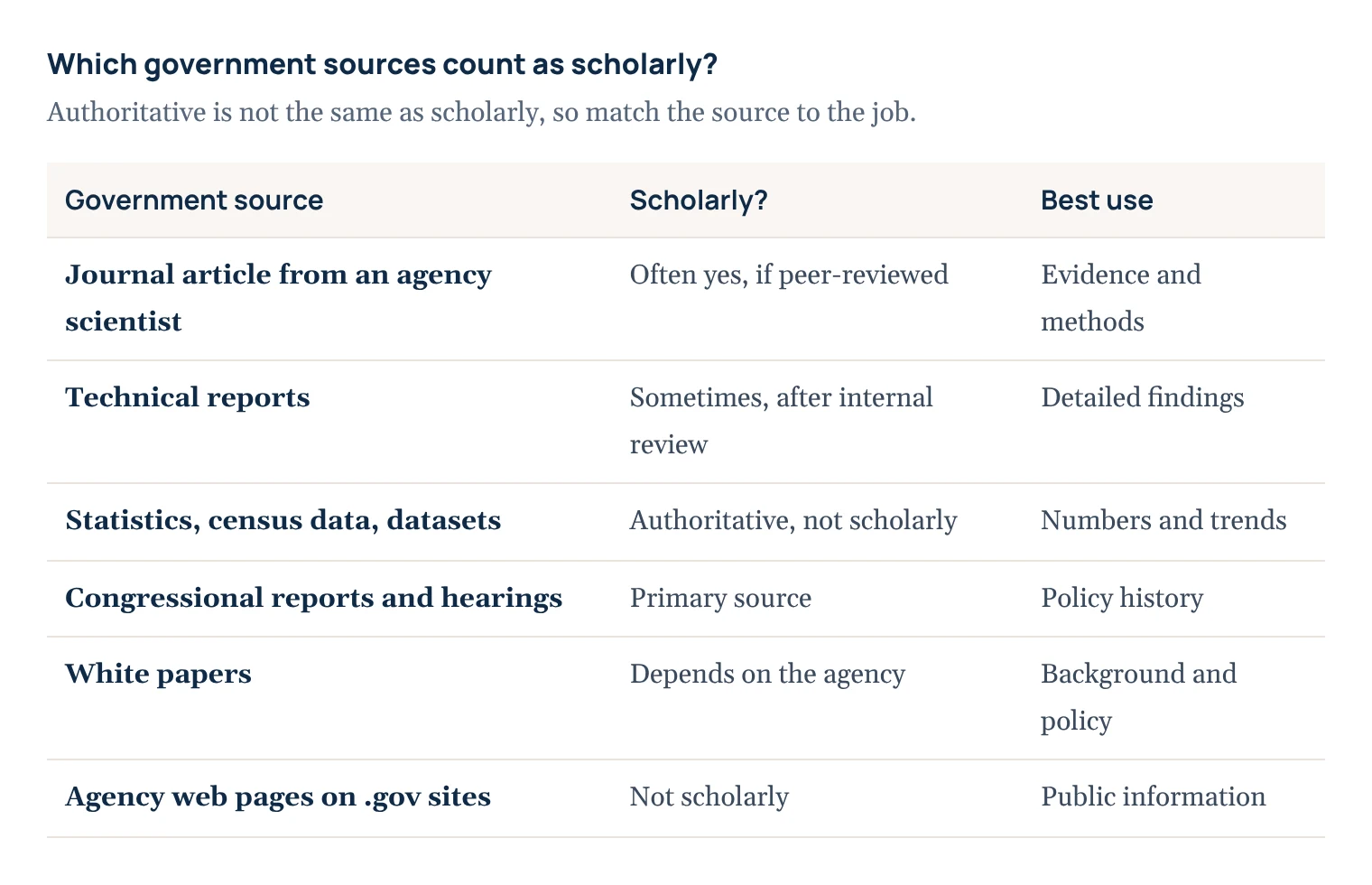
    • Government reports: findings from a department or agency, often with named authors and sometimes with an internal review. Open the report’s first pages to see the author list, the date, and any statement about review.
    • Technical reports: detailed work from federal government labs, usually written by experts and reviewed inside the agency. Because the review is internal, treat these reports as strong evidence but compare them with outside studies on the same topic. Many students treat these reports as a scholarly source, but your instructor may disagree, so confirm first.
    • Statistics and datasets: a dataset or statistical table, such as the census, is a primary source for numbers. Always cite the agency, the table or dataset title, and the year, so readers can find the exact numbers.
    • Congressional materials: hearings, bills, and congressional reports are a primary source for law and policy. They show what lawmakers said and decided, which makes them ideal for history, law, and political science papers.
    • White papers: short policy documents. Treat them as scholarly only when they cite research and show clear authorship. Read the author list and the footnotes first. A white paper with no sources is closer to opinion than to research. Without those signs, a white paper is not a scholarly source.
    • Government publications for the public: guides and fact sheets that educate, but are non-scholarly. Use them to learn terms and basic facts, then move to scholarly articles for analysis. These government documents are useful, but they are not a scholarly source.
    Government documents as a scholarly source: which types are scholarly, authoritative or not scholarly
    Government documents range from peer-reviewed research to plain public information.

    Agency research and internal review processes

    Many agencies employ scientists who publish in outside journals. The same scientists also write agency reports.

    • Agency article: a journal article written by an agency scientist and published in a peer-reviewed journal is scholarly. You can often find these articles through a library database and cite them like any other journal article.
    • Internal review processes: a report may undergo several internal checks, which add quality but are not the same as external peer review. Ask whether the report names its reviewers or describes its quality checks, because the level of review varies by agency.
    • Official source: a department’s own site is the official source for its rules, data, and notices. Citing the official source is better than citing a website that copies it, because copies can be outdated.
    • Biology and health: in biology, medicine, and public health, agency researchers often publish both reports and peer-reviewed articles, so read the credit line. The same scientist may write a short public fact sheet and a full journal article, so make sure you cite the right one.

    How to evaluate government information step by step

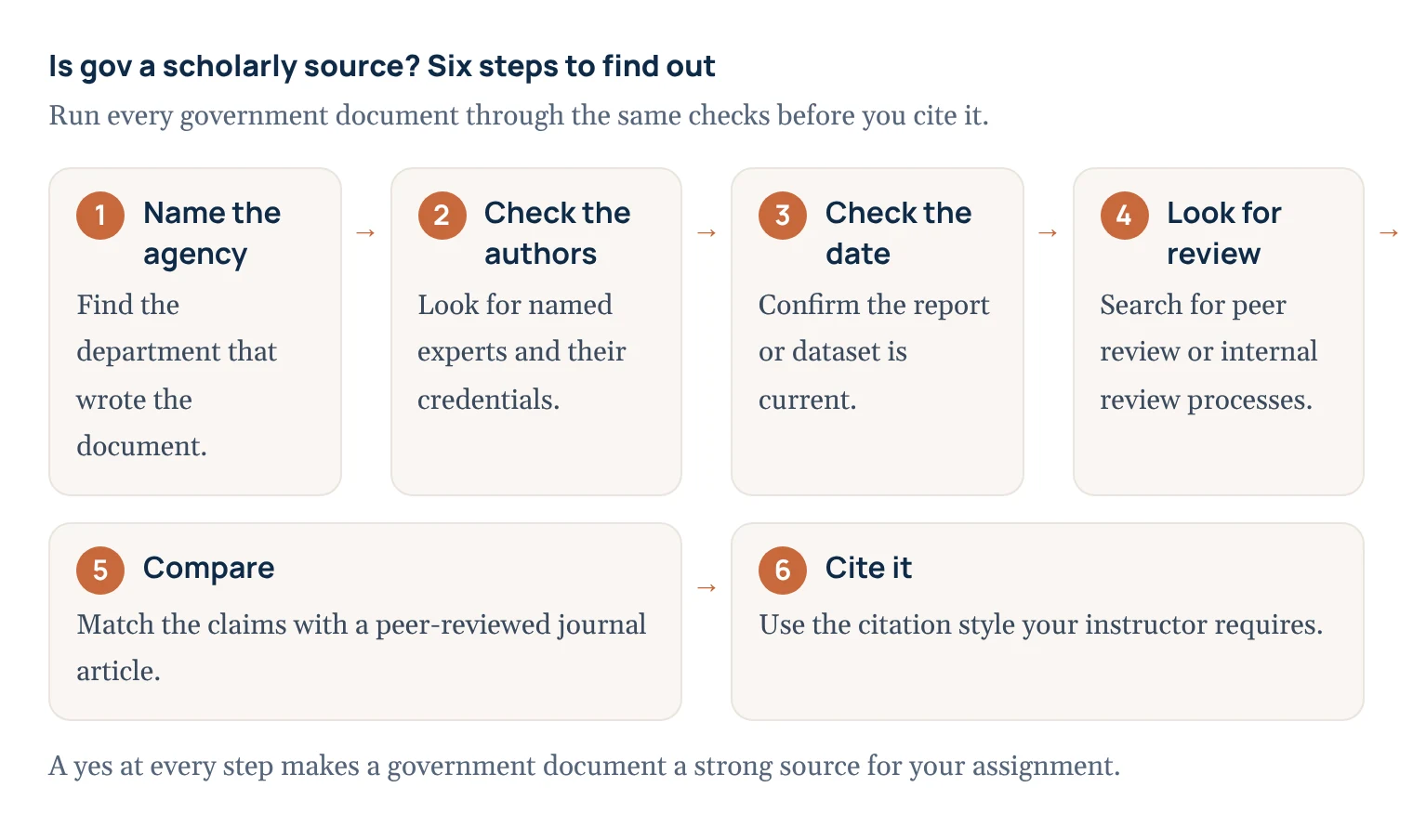
    Use a repeatable method when you evaluate a source. The steps below fit any government document or gov site.

    Is gov a scholarly source: six steps to evaluate a government document before you cite it
    Six steps to decide whether a government document works as a scholarly source.
    1. Identify the agency. Find the department or agency that published the document and check that it has authority on the topic. Look at the About page and the mission statement to confirm that the agency has real authority over the topic.
    2. Check the authors. Look for named experts with credentials. A report with no author is weaker. Search each author’s name to see their credentials and other publications. Weak or missing author details are a warning sign.
    3. Check the date. Policy and data change, so confirm the publication is current. Use the Wayback Machine to see older versions of gov sites. Many pages show a last updated date at the bottom. If it is old, look for a newer version before you cite.
    4. Look for review. Search for peer review, an editorial board, or internal review processes. If you find nothing, assume the document is not peer reviewed and use it only for facts, not for your main argument.
    5. Look for bias. Ask whether a government may have a policy goal that shapes the message. Compare how the agency describes an issue with how independent studies describe it, and note any difference in tone.
    6. Compare and cite. Check claims against a peer-reviewed article, then use proper citation. Keep a note of each check you ran, because instructors sometimes ask you to justify your sources. Only then can you say that the document works as a scholarly source in your paper.

    What to consider when evaluating

    These questions help you think critically about any source of information.

    • Purpose: is the aim to inform, to educate, to persuade, or to report new research? A document that aims to persuade needs more care than one that reports data and methods openly.
    • Evidence: does the document show data, methods, and a list of references? If a report gives results with no methods or references, you cannot test its claims.
    • Bias: check whether a government may present only one side, especially on policy. A government may describe its own programs favorably, so look for outside evaluations. Remember that a document considered a scholarly source by one instructor may not be accepted by another.
    • Fit: consider when evaluating whether the source matches your assignment, your level, and your instructor’s rules. A source that is perfect for a first-year essay may be too general for a thesis.

    Evaluating sources with a librarian

    A librarian can save you hours. Many university libraries publish research guides and run chat services.

    • Library database: ask which database holds government reports and statistical data for your subject. Ask a librarian to show you how to limit results to government documents.
    • Guides at university libraries: a library guide often lists trusted agencies by subject, such as health or education. These guides save time because librarians have already tested the sites and databases.
    • Instructor: confirm whether your assignment accepts government sources as part of a scholarly mix. If the answer is no, use government pages only to find facts and use journals for evidence. Your instructor’s answer settles whether gov is a scholarly source in that course.
    • Critical thinking: read critically, and compare government information with at least one peer-reviewed source. Reading critically means asking who wrote the source, why, and what evidence supports the claim.

    Gov, edu and org compared

    People often ask whether .edu or .gov is more reliable. Neither ending proves a source is scholarly.

    • .gov: reserved for U.S. government bodies, so the publisher is real and the information is official. Because only qualified agencies can register .gov names, the ending is a reliable clue to the publisher, though not to the quality of each page.
    • .edu: reserved for accredited schools. A .edu page can be a professor’s article or a student’s blog, so check the author. Look for a named author, a date, and a reference list before you trust an .edu page.
    • .org: open to many groups. An org site may be a respected society or a lobby, so check its mission. Read the About page and the funding statement to see who stands behind the site.
    • Gov sites abroad: other countries use endings such as .gov.uk or .gov.au, which also signal official publishers. Always confirm the country, because each government publishes its own laws, data, and standards.

    Reputable gov sites for research

    Some .gov sites for research are especially useful for students.

    • Statistics and census: national statistical offices share each census and many statistical tables as free online data. These tables are reused in thousands of scholarly articles, so citing the original agency table is often the strongest option.
    • Health and science: federal health agencies publish reports and links to peer-reviewed research. Follow those links to read the original studies behind the summary page.
    • Law and policy: congressional sites share bills, hearings, and committee reports. Use them to trace how a policy developed and who supported or opposed it.
    • Portal: USA.gov points to official agencies. It is a reliable gateway, but it is not itself scholarship. Use it to find the right department, then cite the page or report you actually used.

    How to find and cite government sources

    Government material is easy to find and cite once you know where to look.

    • Library database: search your library’s database for government reports, technical reports, and statistical collections. Use filters such as government document or technical report to narrow your results.
    • Free online: most agency publications are free online, which makes them easy to use as background information. Free access does not lower the quality, but check the date and the author before you rely on it.
    • Citation: name the agency as the author when no person is listed. Our APA journal article citation guide shows the pattern for articles. Add the agency name, year, title, and web address so the reference is complete.
    • Footnote style: Chicago style uses a footnote for each government publication. Place the footnote after the sentence that uses the document, and repeat the full details in the bibliography if your instructor asks for it.
    • Dead links: if a page disappears, look it up in the Wayback Machine and cite the archived copy. Archived copies prove what the page said on a given date, which helps if the agency later changes it.

    Use government sources the smart way

    Government sources shine for facts, laws, and data. For arguments and theory, add scholarly articles.

    • Background information: use official guides to learn terms and context at the start of an assignment. Starting with plain-language guides makes later scholarly reading easier.
    • Primary source: use laws, hearings, and original datasets as a primary source in history and policy papers. Primary sources let you analyze evidence yourself instead of relying on someone else’s summary.
    • Peer-reviewed sources: pair every key claim with at least one peer-reviewed article when your instructor requires scholarly evidence. This habit shows your instructor that you can combine official facts with expert analysis. This is the safest way to treat government documents when scholarly evidence is required.
    • Source of information: cite the original agency, not a news story that quotes it. You can also compare your approach with our guide on whether Britannica is a scholarly source. Quoting a news story instead of the agency adds a layer of interpretation and may introduce errors.

    Government agencies and what they publish

    Government agencies publish an enormous range of material. Knowing the main sources of information helps you pick the right document faster.

    • Health agencies: publish disease statistics, clinical guidance, and a journal article series written by staff scientists. Check the credit line, because the same agency may publish both public guidance and peer-reviewed research.
    • Education departments: share surveys, test data, and research summaries that support papers in education and the social sciences. These sources are useful for school data, funding trends, and national surveys.
    • Science and environment agencies: release technical reports, maps, and datasets that biology and earth science students can cite. Many of these datasets are free and include documentation that explains how the data were collected.
    • Statistical offices: run the census and publish tables that are reused in thousands of scholarly articles. Because the data are public, you can often compare the original tables with what a scholarly article reports.
    • Legislatures: produce hearings, bills, and congressional reports that show how a policy developed. They are primary sources, which makes them valuable for law, history, and political science papers.
    • National libraries and archives: hold historical government documents, treaties, and records that serve as a primary source. Archives often provide scanned originals, so you can read the document as it first appeared.

    Library research guides and the journal article

    Your library is the fastest route from a government report to a peer-reviewed journal article on the same topic.

    • Library catalog: search for the agency name to find print and digital government publications. Use quotation marks around the agency name to narrow the results.
    • Subject guides: a library guide for your major usually lists the best agencies, datasets, and databases. Subject guides also list the best databases, which can save hours of searching.
    • Journal article search: type the report’s topic into a database and filter for peer-reviewed results to find a matching journal article. Use the same keywords as the report, then add terms such as study or review to find journal articles.
    • Citation chains: check the reference list of a government report, because it often points to scholarly studies you can read. Citation chains are one of the fastest ways to move from a report to peer-reviewed research.
    • Interlibrary loan: if a report is not online, ask your library to request it for you. Interlibrary loan is usually free for students and can deliver a scan within days.

    Worked example: choosing sources for a health paper

    Imagine you are writing a paper about vaccination rates. Here is how a mix of sources works in practice.

    1. Start with government agencies. Pull the latest national statistics from the health department’s data pages. Write down the table title, the year, and the agency name so you can cite the numbers exactly.
    2. Read the technical report. Use the agency’s report to understand the methods behind the numbers. Look for the methods section, the sample size, and the definitions the agency used.
    3. Find the scholarship. Search the library database for peer-reviewed studies that explain why rates differ between regions. Use keywords such as study, trial, or analysis and filter for peer-reviewed results.
    4. Compare claims. Check whether the journal articles agree with the agency’s figures and note any gaps. If the numbers differ, explain why, for example because of different years or definitions.
    5. Cite each source. Name the agency as author for reports and the researchers for journal articles. Use a consistent style, and make sure every in-text citation has a matching reference entry.

    This mix gives your reader official data and expert interpretation, which is exactly what a strong research paper needs. You can use the same approach for history, law, economics, and education topics, with different agencies and databases.

    Why instructors ask about government sources

    Instructors often limit government sources because students use them as shortcuts. Understanding their reasons helps you follow the rules.

    • Depth: many agency pages summarize research for the public and skip the methods that scholars need. If you need the full method, look for the journal article that the agency scientists wrote.
    • Purpose: agency communications may aim to persuade or to promote a service, not to test a hypothesis. Knowing the purpose helps you decide how much weight a statement should carry in your argument.
    • Review: internal review is not independent, so outside experts have not challenged the claims. A truly independent check by outside referees is stronger evidence of quality.
    • Skill building: assignments that require scholarly articles train you to read dense, technical writing. Learning to read journal articles is a core skill in most degree programs.
    • Balance: your instructor may accept government data as long as the argument rests on scholarship. Ask for guidance early so you do not need to replace sources at the last minute.

    When in doubt, send your instructor a short email listing the government documents you plan to use. A two-line reply can save you from losing marks on the final paper.

    Common mistakes and a quick checklist

    Most errors come from treating every .gov page as scholarship. Check this list before you submit.

    • Assuming gov means scholarly: an agency page may be credible and still be non-scholarly. Credible and scholarly are different labels, so decide which one your assignment requires. So whether gov is a scholarly source depends on the document, not the web address.
    • Ignoring dates: old data can mislead, especially in medicine and policy. Check the publication date and look for newer reports on the same topic.
    • Skipping the author: reports with no author or credential deserve extra caution. If you cannot find the author, check the agency’s staff page or choose a better-documented source.
    • Ignoring bias: a government may promote a policy, so read critically. Look for independent studies that agree or disagree with the official view.
    • Dropping other evidence: a strong paper blends government information with scholarly articles. This mix shows your reader both the official facts and the expert interpretation. Used this way, government documents support your argument without pretending to be a scholarly source.

    Choosing a source for a claim

    Weak

    “A .gov page says the policy works, so it must be scholarly.”

    Confuses an official source with peer-reviewed research.

    Strong

    “Agency data show the trend, and a peer-reviewed journal article explains the cause.”

    Uses each source for what it does best.

    FAQs about whether gov is a scholarly source

    Is gov a credible source?

    Yes, in most cases. A .gov address means a government body published the page, so the information is official and usually accurate. Government sites are strong for statistics, laws, and public health guidance. Credible does not always mean scholarly, though. Check the date, the authors, and whether a government may have a policy aim. For assignments that need peer-reviewed sources, use gov pages for facts and add journal articles for analysis.

    Is USA.gov a credible source?

    USA.gov is the official guide to U.S. government information and services, so it is a trustworthy gateway. It mostly links to agencies instead of reporting original research. Use it to find the right department, then cite the agency page, report, or dataset itself. It is a reliable starting point and a source of information for the public, but it is not a scholarly source or a replacement for peer-reviewed articles.

    How do I tell if a source is scholarly?

    Look at the author, the publisher, and the review process. Scholarly sources are written by experts, include references, use technical language, and appear in a peer-reviewed or academic journal. Check the journal’s website for its review policy, search the title in a library database, or ask a librarian. If the piece is an opinion, news story, or public fact sheet, treat it as non-scholarly, even when it is accurate and well written.

    Is .edu or .gov more reliable?

    Neither ending is automatically more reliable. A .gov page comes from a government body, which makes the publisher official. A .edu page comes from a school, but it may be a professor’s research or a student’s blog post. Judge each page by its author, evidence, date, and purpose. The strongest work combines official gov data with peer-reviewed research, and often a .edu library guide to help you evaluate both.

  • Is Britannica a Scholarly Source? What Students Should Know

    Is Britannica a scholarly source? Britannica is a respected, authoritative encyclopedia, but most librarians call it a reference work, not a scholarly source. It is the right place to start your research and the wrong place to finish it.

    This guide explains how Encyclopedia Britannica is written, what Britannica Academic offers, and how to cite it when your instructor allows. It also shows when to move on to peer-reviewed journals.

    Key takeaways

    • Britannica is credible, fact-checked, and written by experts, yet it is a tertiary source. Its articles are carefully edited, but it summarizes research instead of reporting it. That is the short answer to whether Encyclopedia Britannica is a scholarly source.
    • Most instructors accept it for background information, not as the main evidence in an academic paper. Use it to understand a topic quickly, then support your argument with journal articles. So when a classmate asks, is Britannica a scholarly source, the best answer is that it is a background source.
    • Britannica Academic adds journals, primary documents, and multimedia to the classic encyclopedia. These extras make Britannica Academic stronger than the free site for college work.
    • When your paper needs scholarly sources, use journal articles and cite them. Cite only the sources that carry your argument, and keep Britannica for context.
    On this page
    1. Is Britannica a scholarly source?
    2. How Encyclopaedia Britannica is written
    3. Britannica Academic and other editions
    4. How reliable is Britannica?
    5. How to cite Britannica
    6. Britannica vs Wikipedia
    7. How to use Britannica in your research
    8. FAQ

    Is Britannica a scholarly source? Is it considered a scholarly source?

    The honest answer is that Britannica is authoritative but not scholarly in the strict sense. A scholarly source reports original research and passes peer review, while an encyclopedia summarizes what experts already know.

    • Is Britannica a scholarly source: not in the narrow sense. It is a general reference work. A scholarly source reports original research, so a general reference work does not meet the strict test.
    • Considered a scholarly source: some instructors treat Britannica as acceptable, but many do not. Always ask. Rules differ by instructor, so read the assignment brief or send a short email before you cite any encyclopedia.
    • Is Britannica a tertiary source: yes. It collects and condenses primary and secondary sources. Tertiary sources are useful starting points, but they sit one step further from the evidence than journal articles. This is the main reason people ask, is Britannica a scholarly source, and still hear a cautious answer.
    • Is Britannica a reliable source: yes for facts and overviews, with the caveats in this guide. Reliability is about accuracy and trust, so it answers a different question from whether a source is scholarly.

    Scholarly source vs authoritative encyclopedia

    An authoritative encyclopedia is trustworthy, but it plays a different role from a peer-reviewed journal. Knowing the difference keeps your grades safe.

    • Scholarly source: written by experts for experts, with citations and peer review. See how to tell if an article is peer reviewed. Check the author credentials, the references, and the review process before you label any source scholarly.
    • Authoritative encyclopedia: written by experts for a general audience, edited for accuracy, and often called a starting point. This reputation is built on named contributors, an editorial process, and regular revision.
    • Source of information: any item you draw facts from, whether scholarly or not. A source of information can be accurate and still be the wrong choice for evidence in an academic paper.
    • Peer-reviewed journals and professional journals: hold the original research that Britannica summarizes. Follow the references in a Britannica article to reach these original studies.

    How Encyclopaedia Britannica is written

    The Encyclopaedia Britannica began in Scotland in the eighteenth century. Today the Encyclopedia Britannica is a continuously updated online edition with a long print history.

    What is a set of Encyclopedia Britannica?

    People still ask about the printed volumes. A set of Encyclopedia Britannica is a multi-volume print edition, and each edition of Encyclopaedia Britannica reflects what experts knew at the time.

    • Print history: the last print set was issued in 2010, and the company now publishes online. Because print sets age quickly, the online edition is the better choice for current research.
    • Online edition: articles are revised, so the web version is more current than any shelf copy. Always note the date you accessed the page, because online articles may change.
    • Britannica articles: the site includes encyclopedia articles, biography entries, timelines, and fact boxes. These formats make quick lookups easy, but long essays may still need deeper scholarly reading. Each Encyclopedia Britannica entry follows the same clear structure.
    • Authoritative encyclopedia: editors curate topics, assign experts, and review text before it goes live. This curation is why many librarians recommend Britannica as a trusted starting point.

    Who writes and fact-checks the articles?

    Britannica’s authoritative reputation comes from its editorial process. Articles are written by experts and then reviewed.

    • Contributors: academics, scientists, and specialists write signed articles in their field. Check the contributor’s name and field at the end of the article to confirm their expertise.
    • Editors: staff editors vet each article for clarity, balance, and accuracy. This editing is separate from peer review, but it still removes many errors and unclear passages.
    • Fact-checked: fact-checking is routine, and updates follow new research. If you spot a possible error, check it against a second source before you rely on it.
    • Not peer-reviewed: editorial review is rigorous, but it is not the same as the external peer review used for journals. That difference is the main reason most instructors do not count Britannica as a scholarly source.

    Britannica Academic and other Britannica editions

    Britannica sells several editions for different readers. Your library likely pays for the one that fits your level.

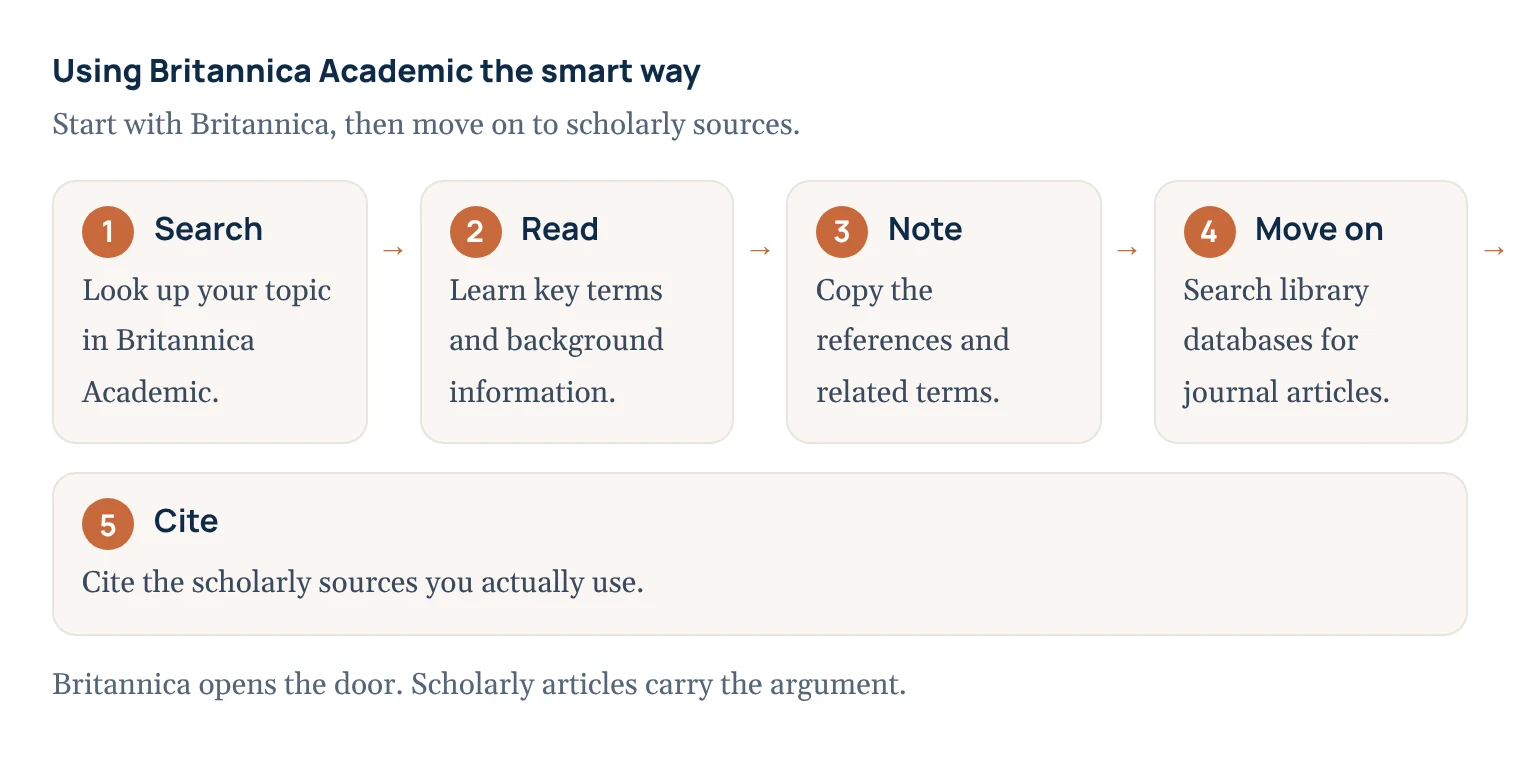
    Is Britannica a scholarly source: five steps for using Britannica Academic in your research
    Five steps for using Britannica Academic as a starting point and moving on to scholarly articles.

    Britannica Academic supports serious inquiry

    Britannica Academic is the version most colleges use. Britannica Academic supports inquiry across every discipline, from classical studies to the social sciences.

    • Britannica Academic: includes the full encyclopedia plus journals, news, and primary documents. This broader mix explains why a library subscription is worth using instead of the free site alone. Britannica Academic is the version most libraries choose for college students.
    • Britannica Academic supports: accessibility tools, translation, and read-aloud features for students. These features also help readers with different needs and languages. Britannica Academic supports readers with different needs.
    • Interdisciplinary reach: topics span biography, science, history, and world data in one place. This range helps students who work across subjects and need quick context in each.
    • Ideal for background: use it to learn terms before you search library databases. Write down the key terms you find, and use them as search words in your next step.

    Britannica School, Collegiate and ImageQuest

    Different products target different grades and needs. Pick the one that matches your assignment.

    • Britannica School: built for school research, with reading levels from elementary to high school. The language is simpler than in Britannica Academic, so it suits younger students best.
    • Britannica Collegiate: a collegiate edition for first-year undergraduates and community college courses. It sits between the school and academic editions in depth and reading level.
    • Britannica ImageQuest: a searchable bank of images and multimedia for projects and slides. Check the usage terms before you reuse an image in a public project or presentation.
    • E-books and multimedia: the platform also hosts e-books, videos, and maps. These extras make the platform more than a text encyclopedia.
    • Library access: ask your library whether it offers a login, because the full version is a paid database. Library logins usually work from home with your student ID. Ask whether Britannica Academic is included in your library’s database list.

    How reliable is Britannica as a source?

    Reliability is not the same as scholarly status. A source can be reliable and still be a poor fit for an academic paper.

    Why is Britannica reliable?

    Several features explain why Britannica is reliable for factual information.

    • Expert authors: most articles are written by experts, and many are signed. Look for a byline at the end of an article, which shows who wrote it and their credentials.
    • Editorial standards: editors check facts, update entries, and correct errors. These standards are why Britannica is trusted for facts, even though it is not peer reviewed.
    • Britannica reliable for overviews: its summaries are concise and accurate for general topics. For a basic definition or date, it is a safe and efficient choice.
    • Britannica source for context: use it to find names, dates, and definitions. Use these details to frame your question before you start your main reading.
    • How is Britannica a reliable source? It combines expert authorship with continuous editing, which gives it a strong reputation for reliability. Reputation is not proof, so still compare important claims with a second source.

    Limits to keep in mind

    No encyclopedia is perfect. Britannica has limits that matter for academic writing.

    • Tertiary: a tertiary source summarizes other work, so it does not contain original research. For original research, move to journal articles or academic books.
    • Broad coverage: overviews can skip nuance, debate, and new findings. A short summary cannot show every argument in a field, so use it as a map and not as the whole territory.
    • Viewpoint: an editor’s choices shape the viewpoint, so check controversial topics in other sources. Compare Britannica with at least one scholarly source when the topic is politically or culturally sensitive. Even Encyclopedia Britannica reflects editorial choices, so compare viewpoints.
    • Not a replacement: the rise of the internet gave students many sources, but Britannica should not replace peer-reviewed journals. More sources means you must choose carefully, and peer-reviewed journals still carry the most weight.
    • Is Britannica a database or website? Both. Britannica.com is a public website, while Britannica Academic is a library database. Name the version you used in your citation so readers can find it.

    What a librarian says about Britannica

    A librarian will usually give you the same advice at any university. Use encyclopedias early and scholarly articles later.

    • Starting point: a good place to get background information and key search terms. Use the headings and related topics to build a list of keywords.
    • Finding scholarly articles: follow the references and related topics to databases of professional journals. Use these references to move from a summary to the evidence behind it.
    • LibGuides: many libraries publish LibGuides that list Britannica next to other reference material. Search your library’s guide for your subject to see which encyclopedias it recommends.
    • Ask first: check the assignment, because some courses ban all encyclopedias. For an example, see the TCNJ library guide on Britannica and Wikipedia. If encyclopedias are banned, use the entry only to find keywords and sources, and do not cite it.

    Britannica and the study of humanity

    Britannica’s strength is its range. It covers the sciences and the arts, from the story of humanity to the latest current events.

    • Humanities: strong entries on history, religion, philosophy, and classical studies. These entries give clear context, but humanities arguments still rest on primary texts and scholarly interpretation.
    • Social sciences: clear overviews of economics, politics, and sociology. They are ideal for learning basic concepts before reading technical studies.
    • Sciences: accessible explanations of biology, chemistry, and physics concepts. Use them to check definitions, but rely on journals for current experimental findings.
    • Literacy: a clean reading level makes it helpful for building subject literacy before reading dense papers. Plain language helps you understand the topic so that scholarly papers feel less difficult.

    A reliable foundation for academic study

    Many professors describe Britannica as a reliable foundation for academic reading. It gives you the vocabulary and the big picture before you tackle specialist papers.

    • Expertly curated: editors choose topics, assign specialists, and revise entries as knowledge changes. This process keeps entries accurate and relevant as new research appears.
    • Information across fields: one search reaches information across science, history, art, and public life. This breadth is useful when a topic crosses several subjects.
    • Especially for students: short summaries and clear headings help new learners find answers quickly. Quick answers help when you are new to a topic, but remember to go deeper for graded work.
    • Journalistic clarity: the writing is plain and journalistic in tone, so it is easy to scan before a lecture. This style makes the text easy to read, though scholarly articles use more technical language.
    • Primary sources: many entries link to primary sources, such as speeches, treaties, and original texts, which you can read directly. Reading the original document shows you exactly what the source said, without a summary.

    These strengths explain why the encyclopedia stays popular in libraries. They do not change its tertiary status, so keep it in the background of your paper.

    Primary sources, secondary sources and encyclopedias

    Understanding the three levels of sources helps you place Britannica correctly. Each level answers a different research need.

    • Primary sources: original evidence such as diaries, interviews, experiments, and data created at the time of the event. These are the closest records to the event itself.
    • Secondary sources: studies and books that analyze primary evidence, such as a history monograph or a review article. They interpret and compare primary evidence, so they are the backbone of most scholarly work.
    • Tertiary sources: encyclopedias, handbooks, and indexes that gather and condense the other two levels. They help you find your way, but they should not be your only evidence.
    • Where Britannica sits: in the tertiary group, which is why most scholarly sources lists leave it out. This placement explains why Britannica is useful for context but not enough for a scholarly source list. So the answer to is Britannica a scholarly source stays the same: useful, but tertiary.
    • How to move up: follow each reference from the entry to a secondary study, then to the primary material behind it. Each step brings you closer to the evidence and strengthens your argument.

    When you move up the levels, you also move closer to original research. That is the habit that separates a thoughtful paper from a summary of summaries.

    Examples: when Britannica helps and when it does not

    Short examples make the rule easier to remember. Compare these situations.

    • Helpful: you must write about the Roman Republic and need a timeline of rulers before reading journal articles. The timeline gives you names and dates, so the journal articles are easier to follow.
    • Helpful: you are preparing a presentation and need a fast definition of photosynthesis for one slide. A short definition is enough for a slide, and you can add a scholarly source in your notes.
    • Helpful: you want to check a date, a spelling, or the basic facts of a historical biography. Fact checks like these are quick and low risk.
    • Not enough: you are writing a literature review, which needs peer-reviewed journals and professional journals. A literature review must show that you read the research itself, not only summaries.
    • Not enough: you are testing a hypothesis, which needs data from an experiment or survey. Original data and methods require primary research or journal articles that report them.
    • Not enough: your instructor asks for three scholarly sources, which means journal articles or academic books. Count only journal articles and academic books toward that number. In that case, Encyclopedia Britannica alone will not meet the requirement.

    How to cite Britannica

    When your instructor allows it, you can cite Britannica like any other reference work. The format depends on your style guide.

    1. Find the entry. Open the article and note the title, the author if one is listed, and the date of the last update. Record the date you accessed the page, since online entries can change.
    2. Copy the web address. Use the stable URL, or the database link if you used Britannica Academic. A stable link helps readers find the same version you used.
    3. Choose your style. APA, MLA, and Chicago each have a format for an encyclopedia entry. Check your style guide for the exact order of the parts.
    4. Write the citation. Include author, article title, Encyclopaedia Britannica, publisher, date, and URL. Keep the same punctuation and capitalization pattern for every reference in your list.
    5. Check it twice. Compare your Britannica citation against your style guide before you submit. A second look catches missing dates and wrong capitals.

    How do you cite Encyclopedia Britannica?

    People search for the exact phrase how do you cite encyclopedia britannica, so here is the short version. Use the entry title as the heading and the date you accessed the page when the style requires it.

    • Britannica citation in APA: author or editors, date, entry title, Encyclopaedia Britannica, and URL. Place the entry in your reference list in alphabetical order. The same pattern works for Britannica Academic entries.
    • Reference Encyclopedia Britannica in MLA: entry title, container title, publisher, date, and URL. Use the container title Encyclopaedia Britannica and the date of the last update.
    • Chicago: a footnote is usually enough, and the bibliography is often optional for reference works. If your instructor wants a bibliography anyway, include the same details in the list.
    • Cite Britannica from a database: name Britannica Academic and the link your library provides. Library links usually include a proxy address, so use the stable link if the database offers one. Name Britannica Academic so readers know which version you used.

    Our APA journal article citation guide shows how to format the journal sources you will pair with Britannica.

    Britannica vs Wikipedia

    Students often ask whether they can use Wikipedia instead. The two are not the same, and neither is a scholarly source.

    • Use Wikipedia carefully: it is helpful for orientation, but anyone can edit it, so accuracy varies. Use it to learn the layout of a topic, not as evidence.
    • Cite Wikipedia: most instructors do not allow it, so follow its references to the original source. If a page lists references, open those sources and cite them instead.
    • Wikipedia articles: often list excellent references at the bottom, which you can mine for scholarly articles. This saves time when you build a reading list.
    • Britannica: has a smaller editorial team, but each article is written and vetted by named experts. The smaller team gives the site a more consistent voice, though the coverage is narrower. Encyclopedia Britannica also names its contributors.
    • Reliability: Britannica is generally more trustworthy, although Wikipedia can be unreliable on contested topics. Even so, check both against scholarly sources for important claims.

    Choosing a source for an essay claim

    Weak

    “Britannica says the theory is true, so I will cite only Britannica.”

    Relies on a tertiary source for the main evidence.

    Strong

    “Britannica gives the overview, and two peer-reviewed journal articles test the theory.”

    Uses each source for what it does best.

    How to use Britannica in your research

    Treat Britannica as a launch pad. A clear routine helps you move from overview to evidence.

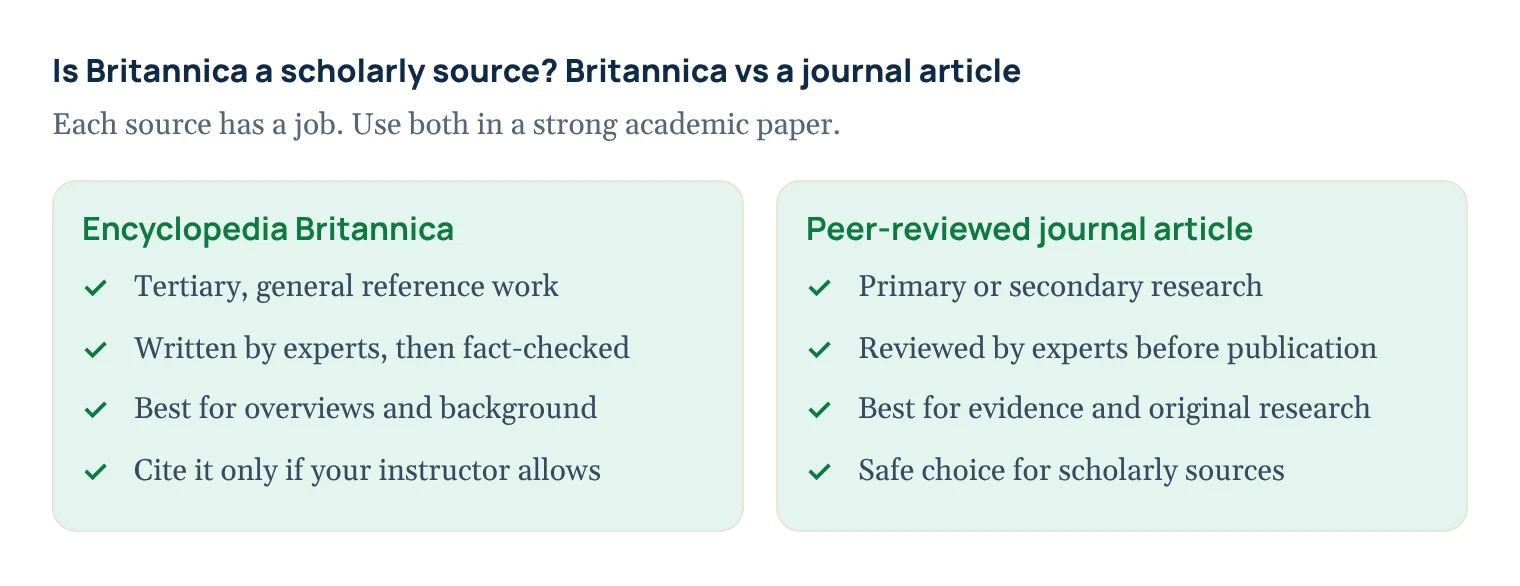
    Is Britannica a scholarly source: Britannica articles compared with a peer-reviewed journal article
    Britannica gives overviews, while a peer-reviewed journal article reports original research.
    1. Read the overview. Skim the Britannica article for definitions, dates, and major debates. Write short notes on the main ideas and terms. Britannica Academic often offers a related topics list that you can use for this step.
    2. List search terms. Write down names, concepts, and alternative words to refine your later searches. Use these words as database keywords in the next step.
    3. Check primary and secondary sources. Look at the article’s sources, then locate primary documents and secondary studies. Follow at least two references to see what evidence supports the entry.
    4. Search a library database. Look for journal articles, books, and professional journals on the same topic. Use the peer-reviewed filter to narrow your list.
    5. Verify the facts. Compare Britannica’s claims with at least one peer-reviewed article. If the sources disagree, explain the difference in your paper. This step answers the question, is Britannica a scholarly source for my topic, with evidence.
    6. Write and cite. Cite the scholarly work you used and add a note if Britannica gave background. A short note helps your reader see how you built your research.

    Academic writing tips for encyclopedia sources

    Good academic writing separates background from evidence. These habits keep your paper credible.

    • Background information: keep encyclopedia facts in your introduction or context paragraphs. These sections set the scene, but they do not need heavy proof.
    • Evidence: reserve your argument paragraphs for original research and peer-reviewed journals. This keeps the strongest sources where your argument needs the strongest support.
    • Primary documents: quote letters, laws, or data sets when your topic allows it. Direct quotes from original documents add authority and variety.
    • Reference material: cite only what you used, and avoid padding with extra encyclopedia entries. Quality matters more than quantity in your reference list.
    • Introduction practice: see our guide on how to write an introduction for a research paper. A clear introduction also uses background facts well, so the two skills support each other.

    Government material is another strong source of information for background and data. Our guide on whether gov is a scholarly source explains when it counts.

    Quick checklist before you cite an encyclopedia

    • Ask your instructor: confirm whether encyclopedias are allowed in your course. Ask early, because some courses accept encyclopedias only for the first draft.
    • Check the date: use the latest version and note when you accessed it. Online editions are revised, so your citation should show which version you read.
    • Add scholarly support: pair each key claim with a peer review backed journal article. This habit proves that you checked the facts against stronger evidence.
    • Stay concise: a single well-chosen entry is better than five overlapping ones. A focused list is easier to read and easier to defend.
    • Be honest: avoid original-research claims that rely only on a tertiary source. Claims about new findings need evidence from the studies that produced them.

    FAQ: Is Britannica a scholarly source?

    These frequently asked questions cover the points students raise most often.

    How reliable is Britannica as a source?

    Britannica is highly reliable for facts, dates, and overviews. Experts write the articles, editors vet them, and the online edition is updated often. Reliability does not make it scholarly, however. It is a tertiary reference work, so it summarizes research instead of reporting it. Use Britannica to learn the basics, then confirm key claims in peer-reviewed journal articles before you build an argument around them.

    Is it okay to cite Britannica?

    Often yes, but check with your instructor first. Many teachers accept Britannica for background information and basic facts, especially in introductory or school courses. Advanced courses usually expect peer-reviewed journals as the core evidence. If you do cite it, follow your style guide, name the entry and the date, and support important claims with scholarly articles so your paper stays strong.

    Is Britannica written by AI?

    No. Britannica articles are written by human experts and reviewed by staff editors. The company has introduced artificial intelligence tools to help readers search and ask questions, and those tools show the sources they used. The encyclopedia content itself remains human written and fact-checked. If you quote an AI answer, name the tool, but cite the underlying article whenever you can.

    Is Britannica considered a website?

    Britannica is both a website and a database. Britannica.com is a free public website with many articles, while Britannica Academic, School, and Collegiate are subscription products that libraries license. Cite whichever version you used, and name the database when you accessed it through your library. Either way, the content counts as a reference work, not as a peer-reviewed journal or an original research report.

  • How to Tell if an Article Is Peer Reviewed

    How to tell if an article is peer reviewed is one of the first research skills students need. The answer is to check the journal, the article, and the library records, because a peer-reviewed article is one that outside experts judged before it was published.

    This guide gives you a clear, step-by-step process. It works for any scholarly journal article, whether you found it in a library database or on a website.

    Key takeaways

    • Peer review is checked at the journal level, so start by identifying the journal. A single journal policy covers all its research articles, which makes this the fastest first check.
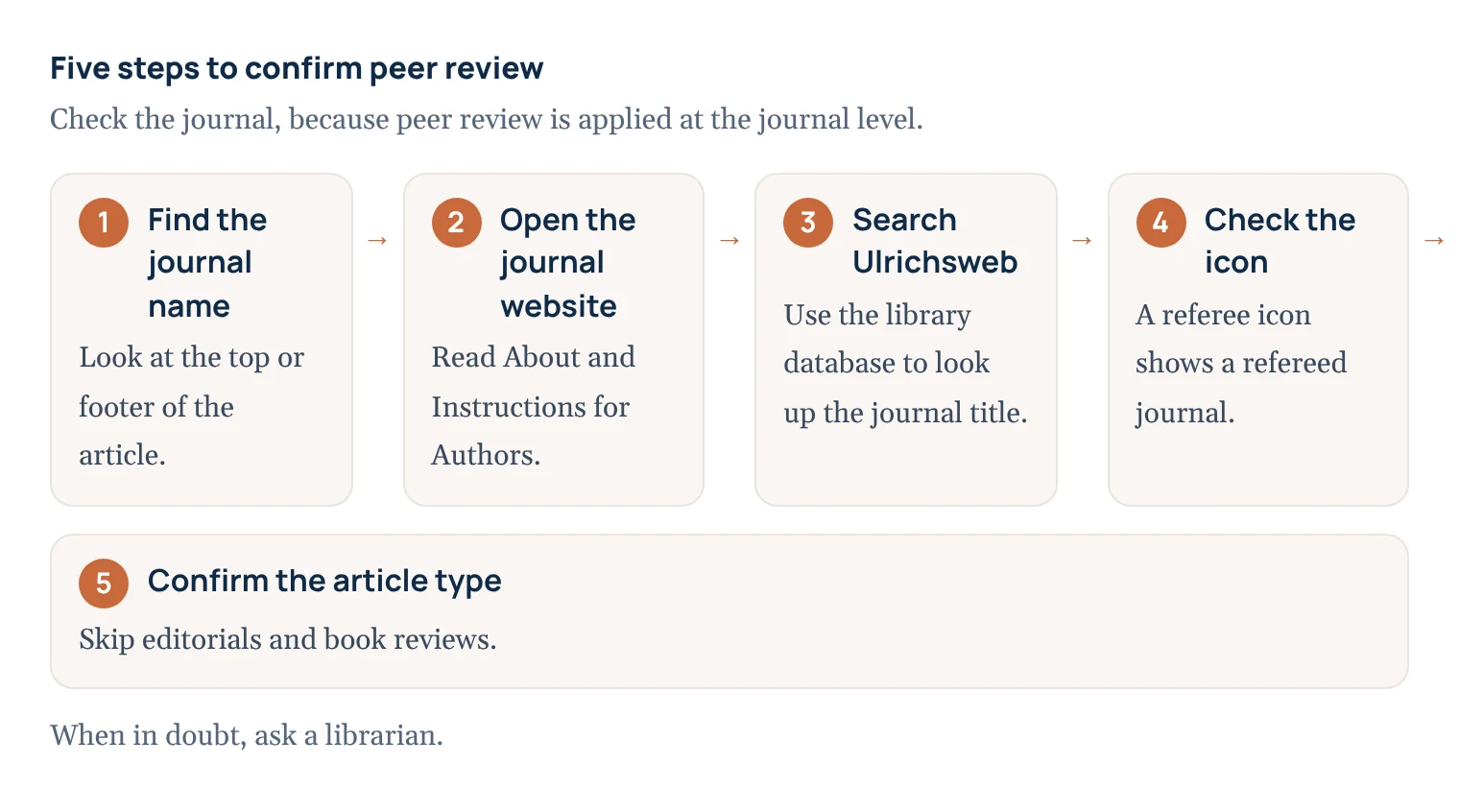
    • Use the journal website, the instructions for authors, and Ulrichsweb to confirm a policy. These three sources usually give you a clear answer within minutes.
    • Not every item in a peer-reviewed journal is peer reviewed. Editorials and book reviews often are not. Always check the article type, because the journal’s policy may not cover every page it prints.
    • A DOI, a reference list, or a .edu address alone does not prove peer review. These features appear on many kinds of publications, so they cannot be used as proof by themselves.
    On this page
    1. How to tell if an article is peer reviewed
    2. What peer review means
    3. Signs in the article itself
    4. Check whether the journal is peer-reviewed
    5. Search a library database
    6. Tricky cases and mistakes
    7. A worked example
    8. FAQ

    How to tell if an article is peer reviewed: the short answer

    You can tell if an article is peer reviewed by confirming that its journal sends submissions to outside experts. You do this in three moves: read the article, read the journal’s policy, and check a library resource.

    • Tell if an article is peer reviewed: find the journal name and look for a statement about peer review. The statement is often on the journal homepage or in the About section, so it takes only a moment to find.
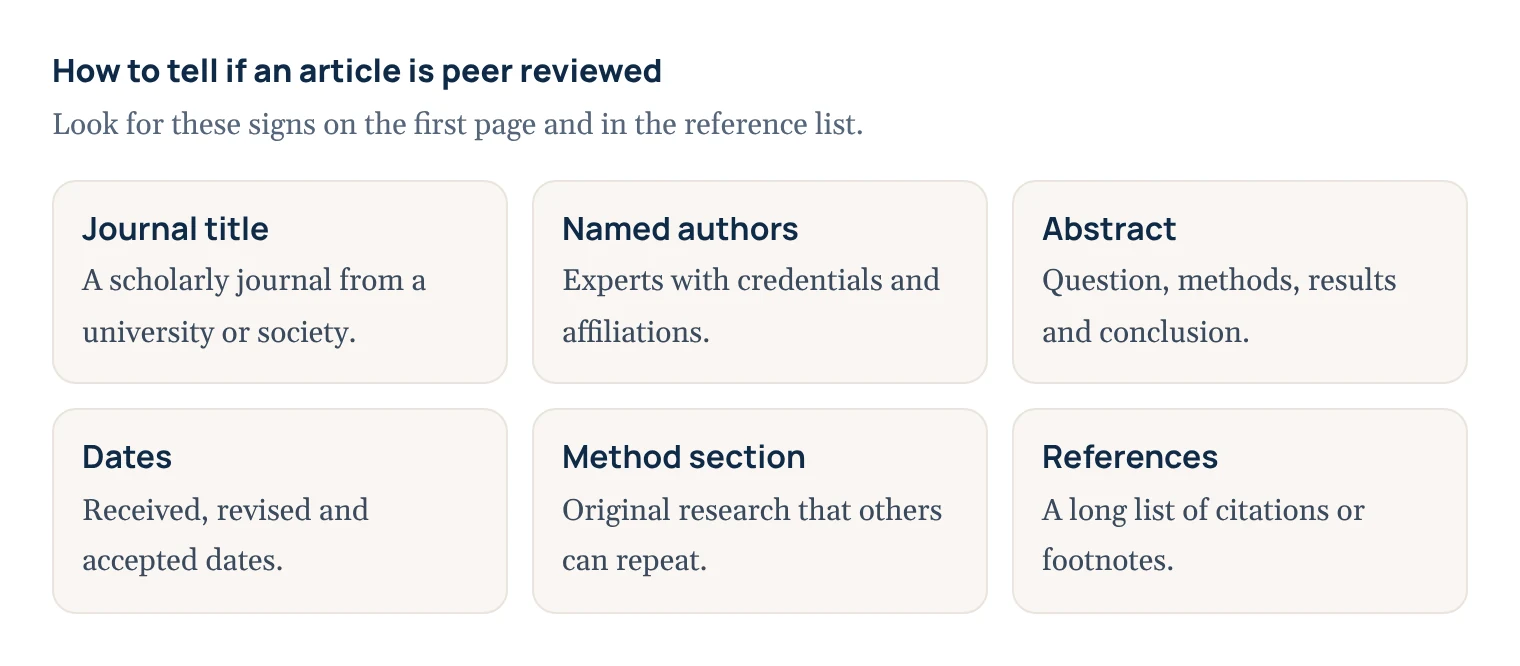
    • Know if this article is peer-reviewed: look for received and accepted dates, a method section, and a long reference list. These details are not perfect proof, but together they point strongly toward a reviewed research article.
    • How can you tell an article is peer reviewed: confirm the journal in Ulrichsweb or on the publisher’s website. Use both sources when you can, because a publisher page and a directory give you two independent confirmations.
    • Ask for help: a librarian can verify any title in a few minutes. Send the journal title and the article link, and a reply often arrives the same day.

    Why instructors ask for peer-reviewed articles

    Your instructor wants evidence that has been tested. Peer-reviewed articles give you that evidence.

    • Quality control: experts in the field challenge the methods before publication. This challenge improves the method, the analysis, and the clarity of the final paper.
    • Originality: reviewers check that the research adds something new. Reviewers compare the study with earlier work to see whether it contributes new knowledge.
    • Trust: a reviewed article is more likely to be accurate than a blog post or news story. That trust is why instructors ask for peer reviewed sources in research assignments.
    • Scholarly conversation: a scholar can cite it and build on it. For a related decision, read whether Britannica is a scholarly source. Both skills help you separate strong evidence from convenient information.

    What peer review means for a scholarly journal article

    Peer review is a process in which experts judge a manuscript before a journal accepts it. The experts are called referees, and they work in the same discipline as the author.

    The peer review process step by step

    Most journals follow a similar path. Understanding it makes the signs easier to spot.

    1. Submission. The author sends a manuscript to the journal. Most journals use an online system that records the date, which later appears as the received date.
    2. Editorial screening. An editor checks fit, quality, and originality. Many papers are rejected at this stage because they do not fit the journal’s scope.
    3. Referee reports. Two or three expert reviewers read the manuscript and suggest changes. The reviewers may stay anonymous, so the author does not know who made each comment.
    4. Revision. The researcher answers each comment and improves the work. This step can repeat several times, which is why review takes months.
    5. Decision. The editor decides whether to accept or reject the paper. Common decisions are accept, minor revision, major revision, and reject.
    6. Publication. The publisher prints or posts the accepted article. The accepted date usually appears on the first page of the final article.

    This peer-review process can take months. It is the reason scholarly articles feel slower and more technical than news.

    Peer-reviewed, refereed and scholarly: the same thing?

    These words overlap, but they do not mean exactly the same thing. Keep them separate in your notes.

    • Peer-reviewed: reviewed by outside experts before publication. This is the label most instructors use in their assignment rules.
    • Refereed: another word for peer-reviewed, used in many library databases. If you see a referee icon in a library database, it means the journal is refereed.
    • Scholarly: written by experts for experts. Most scholarly journal articles are peer reviewed, but some scholarly items are not. Some scholarly sources, such as books or reports, are checked in other ways than journal peer review.
    • Academic: a broad label for material that comes from universities and researchers. Academic is the widest label, so it does not guarantee review.

    Signs inside the article itself

    Look at the article first. Many clues sit on the first page and in the back.

    How to tell if an article is peer reviewed: a visual checklist of signs in a scholarly journal article
    The signs of a peer-reviewed scholarly article, from author credentials to the reference list.
    • Author credentials: the researcher is named, with a university or institution. Search the author’s name to confirm their field and affiliation.
    • Abstract: a short summary of the question, methods, and findings opens the article. The abstract is also the fastest way to judge whether the article answers your question.
    • Dates: “received”, “revised”, and “accepted” dates often signal a review process. Dates are usually printed near the title or in the footer of the first page.
    • Method section: a clear description of how the study was done, so others can repeat it. A strong method section gives enough detail that another researcher could repeat the study.
    • Technical language: the writing assumes you know the discipline. If you cannot follow the terms, a glossary or a review article on the topic can help.
    • Reference list: pages of citations, endnotes, or a footnote trail for every claim. A long list shows the authors built on earlier research, which reviewers expect.
    • Few ads: a scholarly journal rarely carries glossy advertising. Some journals have small notices, but they are rarely full-page ads for products.

    What a popular magazine looks like instead

    Contrast helps you see the pattern. A magazine article is written for a broad audience.

    • Author: often a journalist, with no credentials listed. Magazine writers often interview experts instead of doing the research themselves.
    • Language: simple, with no method section and few or no references. Short, simple articles are written for entertainment or general information.
    • Look: colorful photos, ads, and a catchy title. Eye-catching design is a clue that the target audience is general readers.
    • Purpose: to entertain or inform, not to report original research. Knowing the purpose helps you pick the right source for the job.

    Check whether the journal is peer-reviewed

    An article lives inside a journal, so the journal’s policy matters most. You can verify it in several ways.

    Go to the journal website

    The publisher’s page usually states its policy plainly. Search for the journal by name and open its homepage.

    • About page: look for words such as “peer-reviewed” or “refereed”. If the page says nothing about review, read the next link before you decide.
    • Instructions for authors: this page explains how the journal handles each manuscript, including its peer review process. This page is often the clearest statement of how many reviewers read each paper.
    • Editorial board: a list of named experts from universities is a good sign. A board of working researchers shows that the journal is part of an active scholarly community.
    • Publisher: a university press, a scholarly society, or an established publisher adds trust. Look for the publisher’s name in the page footer or on the article PDF.
    • Policy statements: look for ethics policy and review guideline pages. These pages show that the journal follows publishing ethics standards.

    Know if this article is peer-reviewed with the journal page

    Before you open any database, read the journal page. Two clicks usually give you a clear answer.

    • Determine if the journal is refereed: read the About page, the editorial policy, and the review guideline. Write down what you find so you can cite the source and explain your choice later.
    • Look up the journal by name: search for the journal title, not for the article title. Mixing up the two titles is a common mistake that leads to wrong results.
    • Check the publisher: a press tied to a university or society is a good sign. You can usually find the publisher’s name on the first page of the article.

    Use Ulrichsweb as a resource

    Ulrichsweb is a directory of periodicals that many libraries license. Use Ulrichsweb to look up a journal and see whether it is refereed.

    1. Open your library page. Find the databases list on the library homepage. Many libraries list databases alphabetically, so look under U for Ulrichsweb.
    2. Search for the journal. Type the journal title, not the title of the article. Use quotation marks around the title for a more exact match.
    3. Pick the right entry. Match the publisher and the ISSN. Check the ISSN to avoid confusing two journals with similar names.
    4. Look for the referee icon. The icon shows a refereed or peer-reviewed journal. If the journal has no icon, read its website policy before you decide.
    5. Record the result. Note the date you checked. A dated note helps if you need to recheck later.

    Note that a directory confirms the journal, not each article. The University of Washington Libraries guide explains this journal-level check in more detail.

    Search a library database to identify peer-reviewed journal articles

    You do not have to check every title by hand. Your library database can filter the results for you.

    Use the peer-reviewed filter

    Library search tools include a filter for peer-reviewed or scholarly results. This is the fastest way to find peer-reviewed articles.

    • Library database: open a database such as Academic Search Complete or a subject database for your discipline. Different databases cover different subjects, so choose one that matches your topic.
    • Filter: tick the box for scholarly or peer-reviewed journals before you search. The filter is not perfect, so still verify any title you plan to cite.
    • Search terms: use keywords from your assignment, and combine them with AND and OR. Try synonyms if you get too few results.
    • Check the result: open the record and read the source type and publication details. The record often lists the document type, such as article, review, or editorial.
    • Library guides at university sites: many libraries publish guides that show the filter for each database. These guides often include screenshots, which makes the steps easy to follow.

    Ask a librarian or your instructor

    When you cannot tell, ask. Librarians help students at every state university and community college.

    • Chat service: send the title and the link, and wait for a quick reply. Chat services are usually staffed by trained librarians.
    • Library catalog: a librarian can check how your library classifies the journal. Librarians can also show you how to use special tools for your discipline.
    • Instructor: confirm what counts as acceptable in your course. Instructors may accept some sources that are not peer reviewed, but ask before you assume.
    • Related tip: if a reference points to a government report, see whether gov is a scholarly source. Government reports may be reviewed internally rather than by outside referees.

    Related questions about how to tell if something is peer reviewed

    Students search for this topic in many ways. These short answers cover the most common versions of the question.

    • How to tell if a journal is peer reviewed: open the journal website, read the instructions for authors, and look up the title in Ulrichsweb. This is one of the most common ways to confirm that a journal is peer reviewed.
    • How to know if a journal is peer reviewed: check for a refereed icon in a library database and read the editorial board page. A refereed label has the same meaning as peer reviewed.
    • How to know if a website is peer reviewed: a website is not reviewed as a whole, so find the journal behind the page and read its policy. A website is only a container, so the journal and article policy are what count.
    • How to tell if an article has been peer reviewed: confirm the journal, then confirm that the item is a research article and not an editorial. This two-step check avoids mistakes with editorials and commentary.
    • How do I know an article is peer reviewed: look for received and accepted dates, a method section, and a policy statement from the journal. These clues work best when you use them with a policy check.
    • How to tell if a source is peer reviewed: books are checked by the press, so look for a university press or an editorial review statement. Academic presses review book manuscripts before publication, but the process differs from journal review.
    • Check if article is peer reviewed: use the filter in your library database, then verify the journal in Ulrichsweb. The filter is a shortcut, not a guarantee, so always verify the journal title.
    • How to know if article is peer reviewed: combine the signs in the article with the journal’s policy page. Using two checks gives you a more reliable answer than using either one alone.
    • How to know an article is peer reviewed: never rely on a single sign. Use at least two checks. A second confirmation protects you from a single misleading clue.
    • How to know if the article is peer reviewed: if the journal is refereed and the item is a research paper, the answer is yes. If either condition is missing, look for another source.
    • How to recognize a peer reviewed article: expect experts as authors, a method section, original research, and a long reference list. If most of these signs are present, the article is very likely peer reviewed.

    A how-to checklist you can print

    Use this short how-to checklist each time you pick a source. Tick every line before you add the article to your paper.

    • Journal named: you know the exact journal title and publisher. This simple note saves time if you need to cite the article later.
    • Policy found: the journal states that research articles are peer reviewed. Copy the sentence or save the link as evidence.
    • Directory checked: the journal shows as refereed in Ulrichsweb or in a library catalog. Record the date, since directory entries can change.
    • Article type confirmed: it is an original study or a full review article. Skip editorials and letters even if they appear in the same journal.
    • Quality visible: you can see a method section, results, and references. These sections show that the study can be examined by readers.
    • Citation ready: you saved the journal name, volume, pages, and DOI for your reference list. Saving the details now avoids a search at the last minute.

    Why a scholar trusts the process but still reads critically

    Peer review is a strong filter, but it is not a guarantee. A scholar reads each article with care.

    • Reviewers are human: they can miss errors, so important claims are tested again in later studies. Replication and later studies help correct earlier errors.
    • Replication: good research can be repeated by other researchers, which builds confidence over time. A finding that appears in several independent studies is stronger.
    • Retractions: a journal may withdraw a paper later, so check for correction notices. Retraction notices usually appear on the article page and in the journal archive.
    • Bias: funding and field norms can shape a study, so read the limitations section. The limitations section is where authors explain what their study cannot show.
    • Critical reading: compare the findings with other peer-reviewed articles on the same topic. Agreement among studies is a sign of reliability.
    • Sample size and methods: ask whether the study design supports the conclusions the authors draw. Small samples or weak designs may not support broad conclusions, even in peer reviewed work.

    Tricky cases and common mistakes

    Peer review is not always obvious. These cases confuse many students.

    • Editorials and letters: items inside a peer-reviewed journal may not be reviewed, because editors write them. Check the heading on the page, because these items often have labels such as editorial or commentary.
    • Book reviews: a book review in a scholarly journal is not a research article, so do not count it. A book review is useful for judging a book, but it is not a research report.
    • Review articles: a review of the literature may be peer reviewed, but it summarizes other studies instead of reporting new research. Check the abstract for the words systematic review or meta-analysis, which show that the authors followed a clear method.
    • Preprints: a manuscript on a preprint server has not yet been reviewed. Look for the words preprint or not peer reviewed on the page.
    • Predatory publishers: some sites claim peer review but accept almost anything for a fee. Check whether the publisher appears in trusted indexes and lists, and whether it names its editors.
    • Website pages: a website may host a journal, but check the policy on that website itself. Pages that copy articles from other websites may leave out the review information.

    Does a DOI mean an article is peer-reviewed?

    A DOI only gives the article a permanent address. Preprints, reports, and book chapters can all have one.

    • DOI: shows where the item lives, not whether it was reviewed. Many preprints, reports, and book chapters also have a DOI.
    • Reference list: shows the author used sources, not that referees checked the work. Even weak articles can have long reference lists.
    • University address: shows an institution hosts the page, not that it reviewed the content. A university can host a blog, a thesis, or a student paper as easily as a journal.
    • Citation: when you cite a source, a good citation lists journal name, volume, and DOI. See our APA journal article citation guide. These details also help readers find the article again.

    A worked example: checking one article

    Imagine you found an article on sleep and memory. Here is how to decide whether the article is peer-reviewed.

    1. Read the first page. You see an abstract, author affiliations, and received and accepted dates. These elements are typical of a research article.
    2. Note the journal title. It is a journal name published by a university press. A university press is a good sign, but you still need the policy.
    3. Visit the journal website. The About page states that all research articles are peer reviewed. This sentence confirms that the journal uses a peer review process.
    4. Search for the journal in Ulrichsweb. The record shows a referee icon. The icon confirms the policy in an independent directory.
    5. Check the article type. It is an original study, not an editorial. This matters because the policy may not cover every item in the journal.
    6. Decide and cite. You confirm the article is peer reviewed and add it to your reference list. Now the source is ready for your paper and checks out as peer reviewed.
    How can you tell an article is peer reviewed: five steps from the journal name to Ulrichsweb
    Five steps to confirm that the journal behind an article uses peer review.

    This routine takes under ten minutes. It also builds your information literacy, which helps with every research paper you write, including the introduction for a research paper.

    Judging a source for your paper

    Weak

    “It has a DOI and a reference list, so the article is peer-reviewed.”

    Mistakes common features for proof of review.

    Strong

    “The journal’s policy page and Ulrichsweb both show peer review, and this is a research article.”

    Confirms the journal and the article type.

    FAQ: how to tell if an article is peer reviewed

    These frequently asked questions cover the points students raise most often.

    How to tell if a scholarly article has been peer-reviewed?

    Find the journal name, then read the journal’s website for a peer review policy and its instructions for authors. Next, look the journal up in Ulrichsweb or your library database, where a referee icon shows refereed titles. Inside the article, look for author credentials, an abstract, received and accepted dates, a method section, and a long reference list. If you are still unsure, ask a librarian to confirm.

    What makes an article peer-reviewed?

    An article is peer-reviewed when independent experts in the same field evaluate the manuscript before the journal publishes it. The referees judge quality, originality, and method, and they ask the author to revise if needed. The editor then accepts or rejects the paper. Only articles that pass this process count, which is why editorials and book reviews in the same journal often do not qualify.

    Does a DOI mean an article is peer-reviewed?

    No. A DOI is a permanent link that identifies an item, and many kinds of material can have one, including preprints, reports, and book chapters. It tells you where the item lives, not whether experts reviewed it. To check peer review, confirm the journal’s policy on its website, look it up in Ulrichsweb, and make sure the item is a research article and not a commentary.

    How do you know if a source is scholarly or peer-reviewed?

    A scholarly source is written by experts for other experts, with citations and technical language. A peer-reviewed source has also passed outside review. Check the author, the publisher, the reference list, and the journal policy. Most peer-reviewed articles are scholarly, but not every scholarly item is peer reviewed. When your instructor requires peer review, verify the journal using a library resource before you cite it.

  • How to Write an Introduction for a Research Paper

    How to write an introduction for a research paper is a skill you can learn in an afternoon. A strong introduction tells the reader what the topic is, why it matters, what is still unknown, and what your paper will do about it.

    This step-by-step guide shows you how to write a research paper introduction that is clear and persuasive. You will also see introduction examples, a template, and tips for writing that apply to any subject.

    Key takeaways

    • A good introduction moves from the broad topic to a specific research question. This funnel shape keeps the reader oriented from the first line to the last. This is the core idea behind how to write an introduction for a research paper.
    • Include background information, a short literature review, a research gap, and a thesis statement. Each element has a clear job, and together they make the case for your study. Together they form a complete research paper introduction.
    • Write the introduction last, or revise it after you finish the draft. By then you know your results, so you can write a strong opening that promises only what the paper delivers.
    • Keep it focused. A research paper introduction should be about 10 percent of the whole paper. If your introduction is much longer, move detailed background to the literature review. A short research paper introduction respects the reader’s time.
    Table of contents
    1. How to write an introduction for a research paper
    2. What a strong introduction does
    3. The parts of a research paper introduction
    4. Step-by-step: write a research paper introduction
    5. Introduction examples and a template
    6. Tips for writing and common pitfalls
    7. FAQ

    How to write an introduction for a research paper: the short answer

    Start broad, narrow to a gap, and finish with your aim. That order helps the reader understand the context and see why your work is worth reading.

    • Hook: open with a fact, a question, or a problem that makes the topic matter. A specific hook works better than a general statement because it gives the reader a reason to keep reading.
    • Background: give sufficient background information for a reader outside your field. Define unfamiliar terms briefly, and keep the focus on what your reader needs to follow the argument.
    • Gap: show what previous studies have not answered. A clear gap shows that your study is needed, and it leads naturally to your question.
    • Aim: state your research question or thesis statement clearly. Make the aim specific enough that the reader can tell what you will measure or argue.
    • Roadmap: tell the reader how the rest of the paper is organized. A short roadmap helps readers who scan the paper before they read it in full.

    Write a research paper introduction: what to expect

    When you write a research paper introduction, think of it as a short argument. Each sentence should lead the reader one step closer to your question.

    • Length: a typical introduction runs one to three pages in a journal paper, and a few paragraphs in a student essay. Check the word limit or the journal guidelines, because they may set a firm maximum. A research paper introduction should never feel longer than the argument needs.
    • Tone: clear, formal, and direct, in the style used in academic writing. Avoid slang, contractions, and long chains of clauses, and choose precise verbs.
    • Tense: use present tense for general facts and past tense for earlier studies. This pattern is common in many fields, though your style guide may differ.
    • Citations: support key claims with sources. For help, see our APA journal article citation guide. Cite the studies that support each key claim, so the reader can check them.
    How to write an introduction for a research paper: a funnel from broad topic to specific research question
    A research paper introduction narrows from the broad field to your specific research question.

    What a strong introduction does

    A strong introduction does more than announce a topic. It makes the reader care, shows the scope, and promises a clear contribution.

    Good introduction vs perfect introduction

    Many students chase a perfect introduction and get stuck. A good introduction is enough if it does the core jobs well.

    • Good introduction: names the topic, shows the gap, and states the aim in plain language. This is the standard to aim for, because it delivers every core job in a short space. A good research paper introduction is clear before it is clever.
    • Effective introduction: adds a clear reason why the research is important and who benefits. Explaining the benefit helps the reader see why the work matters beyond the classroom or lab.
    • Perfect introduction: does not exist on the first draft. Revise after the results are final. Write a solid draft first, and polish it after the rest of the paper is complete.
    • Long introduction: avoid it. A long introduction hides the point and tires the reader. If a section feels slow, cut details that belong in the literature review or the methods.

    Write the introduction last

    Many researchers write the introduction first in a rough form and finish it last. That way the introduction matches what the paper really argues.

    • Introduction first: draft a rough version to focus your thinking and plan the outline. A rough draft acts as a plan, and you can replace it once the argument is clear.
    • Revise at the end: after you finish the draft, rewrite it so it promises only what you delivered. This keeps the reader’s expectations in line with your actual results.
    • Check the match: the end of the introduction should line up with your conclusion. If the two disagree, update the introduction rather than the evidence.
    • Related reading: a title page also helps readers, so see our guide to the research paper cover page. A clear title page and a clear introduction together create a professional first impression.

    The parts of a research paper introduction

    Every research paper introduction contains the same building blocks. Think of them as seven parts that sit in order.

    Background information and key terms

    Background information helps the reader understand the context. Define the key terms and explain why the topic is important.

    • Set the stage: in two or three sentences, describe the topic of interest and its broader field of study. This short section gives the reader a map of the territory before you narrow your focus. Anyone interested in learning how to write a research paper introduction should practice this step first.
    • Define key terms: explain words that a reader outside your discipline may not know. Keep each definition to a short phrase so it does not interrupt the flow.
    • Significance of the topic: show why the topic is important to people, policy, or science. Give one or two reasons, such as cost, safety, or social impact, instead of a long list.
    • Stay focused: include only information for readers that supports your argument. Cut interesting facts that do not lead toward your question.

    Literature review and research gap

    Next, summarise the relevant literature. You do not need a full literature review here, only the main findings that lead to your question.

    • Previous research: name two or three important studies and what they found. Mention the author names or years only where they help the reader trace the source.
    • Existing studies: group them by theme, such as method, region, or theory. Grouping shows you can see patterns, instead of listing studies one by one.
    • Research gap: point out what is missing, unclear, or outdated in existing research. State the gap in plain words, so the reader can repeat it back.
    • Current state of research: describe the debate honestly, including the limits of earlier work. This honest summary builds trust, because readers see that you know the limits of the field.
    • Systematic review: if a systematic review exists on your topic, cite it as a strong overview. A systematic review gives the reader a quick, reliable summary of the evidence.

    Research problem and research question

    Now state the problem. A clear research problem makes the reader want an answer.

    • Research problem: describe the puzzle, conflict, or need that your study addresses. A clear problem statement makes the rest of the paper easier to follow.
    • Research question: write one question that your paper will answer. Keep the question narrow enough that your paper can answer it fully. A research paper introduction needs one clear question to hold it together.
    • Research objectives: list the objectives of the study in one or two sentences. Use verbs such as examine, compare, or test so the objectives are measurable.
    • Scope: mention the specific aspect, group, or time period you cover. A narrow scope prevents readers from expecting results you cannot provide.

    Thesis statement and original research

    The thesis statement is your main claim. In a report of original research, it often appears as a hypothesis.

    • Thesis statement: a single sentence that tells the reader your position. If your thesis is arguable and specific, the reader knows what the paper will prove.
    • Hypothesis: in exploratory studies, state what you expect to find. Write the hypothesis in a way that your data can support or reject.
    • Main contribution: say what your study adds, such as new data, a new method, or a new theory. This sentence tells the reader what is new about your work.
    • Roadmap: end with one or two sentences about the order of sections. Avoid repeating the table of contents, and describe the flow of the argument instead.

    Step-by-step: write a research paper introduction

    Follow this process the next time you write a research paper introduction. It works for a term paper, a thesis chapter, or a journal manuscript.

    1. Define your topic and question. Write your research question in one sentence before you draft anything. A clear question will guide every later choice in the draft.
    2. Collect background information. Gather the facts and key terms your reader needs to understand the topic. Choose only the facts that help the reader follow your argument.
    3. Review previous research. Read recent published papers and note what they found and missed. Use recent studies, and include at least one that supports your view and one that challenges it.
    4. Find the research gap. Write one sentence that begins “However, little is known about…”. This sentence is the hinge of your introduction, so spend time getting it right.
    5. Write the hook. Choose an opening sentence that is specific and relevant to your topic. Try several versions, and keep the one that is the most specific. The hook is the first thing a reader sees in your research paper introduction.
    6. Draft the aim and thesis. State your research objectives and your main claim. Make sure the aim matches the question and the thesis matches the aim.
    7. Add the roadmap. Summarize the structure in one or two sentences. This tells the reader what to expect and how the paper is organized.
    8. Revise. Cut anything that does not guide the reader to your question. Read the introduction aloud, which helps you find sentences that do not fit. This final pass turns a rough draft into a polished research paper introduction.

    The USC Libraries guide to writing the introduction describes the same movement from a broad subject to a specific research problem.

    Five ways you can start your introduction

    The opening sentence sets the tone. Pick the style that fits your discipline.

    • Surprising fact: start with a statistic that shows the scale of the problem. Make sure you can cite the source of the statistic.
    • Question: ask the question your research answers. A question works well when it reflects a real debate in your field.
    • Short anecdote: use a one-line example from real life. Keep the anecdote short and link it to your research problem.
    • Broad claim: make a general statement about the field and then narrow it. This approach is common in the humanities and social sciences.
    • Definition or quote: use only when it truly sharpens your argument. Quotes should come from a respected source and should relate directly to your thesis.

    What is included in the introduction of a research paper?

    Readers often ask what to include. The short answer is context, a gap, and a plan.

    • What is included in introduction of research paper: the hook, context, gap, aim, and roadmap. Keep the list in order, so the reader moves from broad to specific.
    • What should be in the introduction of a research paper: background, literature, gap, aim, and roadmap. This is the most common question that students search for about introductions.
    • What is in an introduction of a research paper: the same items, in a compact order. Adjust the length to the type of paper and the word limit. Every research paper introduction follows this pattern in some form.
    • What to write in an introduction of a research paper: only what helps the reader follow your argument. If a sentence does not help the reader, remove it.
    • Introduction to the research: a brief overview that tells the reader what you studied and why. Use this phrase for a short overview that is not a full introduction.

    Introduction examples and a template

    Seeing a finished research paper introduction makes the structure clear. The example below uses a topic from sleep science.

    Introduction examples you can adapt

    Here are short examples of a hook, a gap statement, and an aim. Replace the details with your own.

    • Hook: “Nearly one in three adults sleeps less than the recommended seven hours.” This opening uses a specific number and a clear problem.
    • Background: “Sleep supports memory, mood, and long-term health, and it has been studied for decades.” This sentence sets the stage in plain language.
    • Gap: “Previous studies have looked at adults, but few have examined first-year university students.” This sentence introduces the gap that the study fills.
    • Aim: “This paper argues that late-night study harms exam performance in this group.” This sentence states the thesis and the group studied.
    • Roadmap: “The next section reviews relevant literature, then the method, results, and discussion.” This sentence prepares the reader for the structure of the paper.

    A research paper introduction template

    Use this template as a starting frame. Fill each line with one or two sentences.

    1. Opening sentence: “[Topic] is important because [reason].” Replace the brackets with your own details.
    2. Context: “Research on [topic] has focused on [theme], showing that [finding].” Name the theme and the main finding of the earlier work.
    3. Gap: “However, existing studies have not explained [missing piece].” Use a clear contrast word such as however or yet.
    4. Aim: “The present study examines [question] using [method].” Add the method if it helps the reader understand your approach.
    5. Contribution: “This paper also contributes [new knowledge] to the broader field.” Describe the contribution in one concrete phrase.
    6. Roadmap: “The paper is organized as follows…”. Adjust the wording to the order of your own sections.
    Write a research paper introduction: a table of the seven parts of an introduction with a one-line job for each
    Seven parts of a research paper introduction and what each one does.

    What is a good opening sentence for a research paper?

    A good opening sentence is specific, relevant, and short. It should tell the reader why the topic is important without exaggeration.

    • Be concrete: use a number, a place, or a clear problem. A concrete opening feels more credible than a vague claim.
    • Avoid clichés: skip lines such as “Since the dawn of time”. Clichés waste your most valuable sentence and signal a lack of focus.
    • Fit your field: science papers open with data, while humanities papers often open with a question or a text. Check recent papers in your journal to see which style they use.
    • Link to the gap: the opening should point toward your research problem. A good opener makes the gap feel natural, not forced.

    Tips for writing and common pitfalls

    Strong writers share a few habits. These tips for writing introductions help you avoid slow starts.

    Tips for writing introductions

    • Write for the reader: assume the reader needs clear context and no jargon. If a classmate cannot follow your first paragraph, add more context. Readers of a research paper introduction have little patience for jargon.
    • Be concise: use plain language, and prefer short sentences. Plain language shows confidence and helps non-specialists understand.
    • Keep the order: general first, specific last. This keeps the reader moving toward your central question without confusion.
    • Use topic sentences: each paragraph should have one main idea. Start each paragraph with a sentence that states its point.
    • Check your style guide: follow APA, MLA, or Chicago for citations and headings. Different styles have different rules for headings, citations, and title pages.
    • Ask for feedback: a classmate who is not familiar with your field is the best test. Ask your reader to restate your question, and rewrite anything they miss. Feedback is the fastest way to improve a research paper introduction.

    Common pitfalls in writing introductions

    Avoid these mistakes. They are the most common reasons readers lose interest.

    • Too broad: opening with the history of the whole discipline wastes space. Move the history to the literature review if it matters.
    • Too long: a long introduction pushes your question too far down the page. A tight introduction lets the reader reach your question quickly.
    • No gap: without a gap, the reader asks why the study matters. State the gap clearly, so the study’s value is obvious.
    • Vague aim: if the reader cannot repeat your question, rewrite it. Test this by asking a friend to explain your question in their own words.
    • Overpromising: do not claim results the paper does not present. Promise only what your data or sources can support.
    • Copying: never paste text from another source without citation. Always quote, paraphrase, and cite properly to avoid plagiarism.

    Related questions about research paper introductions

    Students search for this topic in many ways. These short answers cover common variations.

    • How to write an introduction of research paper: follow the funnel from hook to question. Start broad, narrow to the gap, and finish with your aim. This is the shortest answer to how to write an introduction for a research paper.
    • How to write introduction for a research paper: draft a rough version, then revise it after the final results. This approach gives a clear first draft, which you can improve later.
    • How to write an introduction in a research paper: use the seven parts in this guide. The seven parts are the hook, background, literature, gap, aim, thesis, and roadmap.
    • How to write an introduction in research paper: keep each part to a few sentences. A few sentences per part is usually enough for a student paper.
    • Research paper introduction paragraph: a short paper may need only one paragraph that includes hook, gap, and thesis. Use one focused paragraph for a short essay or a class assignment.
    • Introduction of a research paper: usually about ten percent of the total length. If your paper is 5,000 words, an introduction of around 500 words is usually enough. A research paper introduction is usually short compared with the body.
    • Introduction research paper checklist: hook, context, gap, aim, thesis, roadmap. Tick each item before you move on to the body of the paper.
    • How to write a term paper introduction: use the same steps, but with a lighter literature review. A term paper may need only two or three studies in its background.
    • How long should the introduction of a research paper be: one to three pages for journal papers, and one or two paragraphs for short essays. Check the assignment or journal instructions for a firm limit.
    • How to start a research paper off: open with a specific fact or question, then give context. A concrete opening works better than a broad statement about history or society.
    • How do I start off a research paper: write your research question first, then build outward. This order keeps your introduction focused and logical.
    • How do you start off a research paper: gather context, find the gap, and draft the hook last. Drafting the hook last lets you choose the best opening for the final argument.
    • How can I start a research paper: make a short outline and write a rough introduction. An outline reduces the fear of the blank page.
    • How do you start a research paper off: avoid vague openers, and use a concrete statement. Replace general phrases with a specific fact or example.

    An opening for a research paper

    Weak

    “Sleep is very important to everyone in the world.”

    Vague, and it does not point to a gap.

    Strong

    “Nearly one in three adults sleeps less than seven hours, yet few studies track students.”

    Specific, and it leads to the research question.

    Effective introduction: a final quality check

    Once your draft is ready, test it against a short list. An effective introduction passes every line.

    • Provide a clear aim: a reader should be able to repeat your research question after one read. If a reader cannot restate it, rewrite it until it is clear. Every research paper introduction should pass this simple test.
    • Provide enough context: include enough background so that a new reader can follow the topic without extra reading. A reader who is new to the field should not need extra reading to follow your opening.
    • Allow the reader to understand the stakes: explain what changes if the question stays unanswered. Stakes help the reader care about the answer.
    • Reader to understand the significance: add a sentence on the significance of the research for practice, policy, or theory. The significance may be practical, theoretical, or both.
    • Ensures the reader keeps going: a strong hook and a clear gap make the next paragraph feel necessary. A strong hook and gap work together to create momentum.
    • Clearly articulate the gap: avoid hints, and name the missing evidence in plain words. A vague hint does not persuade, so state exactly what is unknown. A research paper introduction is strongest when the gap is explicit.

    Theoretical framework and the broader field

    Some papers also need a theoretical framework. Mention it briefly in the introduction and explain it in full later.

    • Theoretical framework: name the theory or model that guides your study in one sentence. Use only one sentence, and explain the framework in the literature or methods section.
    • Within the broader field: show how your question fits within the broader field of study. This helps the reader see the larger picture.
    • Theoretical and practical value: explain both the theoretical and practical reasons the work matters. Mention both when your field values both.
    • Advancing knowledge: say how your study helps advancing knowledge, even in a small step. Be modest and specific, and avoid claiming to change the whole field.
    • Research topic: keep your research topic narrow enough to finish in the space you have. A narrow topic is easier to finish and easier to defend.

    How the introduction connects to the rest of the paper

    The introduction is also a promise. The rest of the paper must keep that promise.

    • Entire paper: the structure you preview should match the headings in the entire paper. If the headings change, update the roadmap.
    • Present the results: do not present the results in detail here. Give only a short hint of the main outcome if your field expects it. Some fields expect a summary of the main finding, so check recent papers in your journal.
    • Research clearly stated: your questions and objectives should reappear in the discussion and conclusion. This repetition creates a clear thread through the paper.
    • Research may change: if your findings shift during writing, update the introduction to match. Re-read the introduction after you finish the discussion.
    • Paper must stay consistent: every claim in the introduction must be supported later by evidence. Promises that the paper does not keep will cost you credibility. A consistent research paper introduction builds the reader’s trust.
    • Create an introduction last: when you write a research paper introduction in a final pass, it is easier to keep it accurate. It is also easier to stay honest about what the paper achieved.

    Writing a paper: how to write an introduction for a research paper in a hurry

    Short on time? Writing a paper under a deadline is stressful, but you can still draft a clear opening in about thirty minutes.

    • Five minutes: write your research question and your main claim. Do this before you open any template.
    • Ten minutes: list three facts of background information and two earlier studies. Choose facts that you can cite from reliable sources.
    • Ten minutes: draft the hook, the gap, and the aim in order. Write quickly, and polish later.
    • Five minutes: add the roadmap and cut any sentence that does not help the reader. Read the introduction aloud as a final check.
    • Afterward: revisit the research paper introduction once the body is done, because a first draft rarely matches the final argument. Revision is where a good introduction becomes a strong one. Even experts revise their research paper introduction several times.

    Practice makes this faster. After two or three papers, you will know how to write an introduction for a research paper almost by habit, and your research paper introduction will read more clearly.

    FAQ: how to write an introduction for a research paper

    These frequently asked questions cover the points students raise most often.

    What are 5 ways you can start your introduction?

    You can start with a surprising statistic, a direct question, a short anecdote, a broad claim that you then narrow, or a brief definition or quote. Pick the option that fits your discipline and topic. Whichever you choose, keep the opening specific, link it to your research gap, and avoid clichés. The first sentence should make the reader want to read the second one.

    What are the 7 parts of introduction in research?

    The seven parts are the hook, the background information, a short literature review, the research gap, the aim or research question, the thesis statement or hypothesis, and the roadmap. They run from broad to specific, so each part prepares the next. Short papers may merge some parts into one paragraph, but a complete introduction covers all seven ideas in some form.

    What is a good introduction example?

    A good example opens with a specific fact, adds context, points to a gap, and states an aim. For instance: nearly one in three adults sleeps too little, earlier studies focused on adults, and this paper tests the effect on first-year students. That short sequence shows the topic, the gap, and the purpose clearly. Adapt the pattern to your own subject and add citations for each claim.

    What is a good opening sentence for a research paper?

    A good opening sentence is specific, short, and relevant to your research problem. Use a number, a concrete problem, or a precise question instead of a broad statement about humanity. Science papers often open with data, while humanities papers may open with a text or question. Avoid clichés, and make sure the sentence leads toward the gap that your study fills.

  • APA Journal Article Citation: A Simple 7th Edition Guide

    An APA journal article citation tells your reader exactly where you found a source. In APA 7th edition, the pattern is author, year, article title, journal name, volume, issue, pages, and DOI.

    This APA citation guide explains each part with simple rules and clear examples. It also answers the questions that students ask most about DOIs, URLs, and long author lists.

    Key takeaways

    • Use the pattern: Author. (Year). Article title. Journal Name, volume(issue), pages. DOI. Learn this pattern once, and you can format almost any journal article reference.
    • Write the article title in sentence case and the journal name in title case. These two capital rules are the most common source of errors in student reference lists.
    • List up to 20 authors. For 21 or more authors, use the ellipsis rule. The ellipsis keeps long author lists short while still crediting the final author.
    • Give the DOI as a full link, and skip database names for most articles. The DOI link is the most stable way to point readers to the article.
    On this page
    1. APA journal article citation: the short answer
    2. The parts of the citation
    3. DOI, URL and database rules
    4. Step-by-step: cite a journal article
    5. Examples for each source type
    6. Common mistakes and a checklist
    7. FAQ

    APA journal article citation: the short answer

    A reference list entry for a journal article has the same shape every time. Learn the pattern once and you can cite almost any article.

    • APA journal article: author, year in parentheses, article title, journal name, volume, issue, page range, and DOI. This is the core pattern for all APA journal article references, whatever the subject of the article.
    • APA 7th edition: also written APA 7, the current edition of the Publication Manual of the American Psychological Association.
    • APA 7th ed journal article: the same pattern, and no “Retrieved from” before the DOI. Older guides used Retrieved from, but APA 7 removed it for most articles because the DOI already tells readers where to look.
    • APA cite for journal article: in the text, use the author and year in parentheses, such as (Lee, 2020). The in-text citation points the reader to the full entry in your reference list.

    The APA 7th edition journal article format

    Here is a model reference with each part in order. Use it as a template for your own work.

    • Pattern: Author, A. A., & Author, B. B. (Year). Title of the article in sentence case. Title of the Journal in Title Case, volume(issue), pages. https://doi.org/xxxx
    • Example: Lee, M. K., & Patel, R. (2020). Sleep and memory in first-year students. Journal of Student Learning, 12(4), 33–45. https://doi.org/10.1234/example
    • Hanging indent: indent the second and later lines of each entry by half an inch. Word processors can apply a hanging indent automatically from the paragraph settings.
    • Order: alphabetize the reference list by the first author’s surname. If two entries share the first author, order them by the next author or the year.
    APA journal article citation: the parts of an APA 7th edition reference for a journal article
    Each part of an APA journal article citation, from author to DOI.

    The Purdue OWL page on articles in periodicals shows the same structure with more samples.

    The parts of an APA citation for a journal article

    Break the reference into small pieces. Each piece has its own rule.

    Author names: one author and 21 or more authors

    Authors come first. Write the surname, then initials, and keep the order from the article.

    • One author: Smith, J. (2021). Use the same pattern for the author’s surname, initials, and year every time you cite this source.
    • First initial and second initial: include both when the author uses two, as in Smith, J. A. Do not spell out the first name, and keep the initials in the order shown in the article.
    • Two to twenty authors: list every author, and place an ampersand before the last name. Use a comma between authors, and an ampersand only before the last name.
    • 21 or more authors: list the first 19 authors, add an ellipsis, then give the final author. Do not use an ampersand there. This rule applies only to very long author lists, so most articles follow the simpler pattern.
    • In-text: for three or more authors, write the first author’s surname and “et al.”. Write et al. with a period after al, and do not italicize it.
    • Author’s name: if no author listed, move the article title to the author position. This often applies to unsigned editorials and reports, and it keeps the entry in the right alphabetical place.

    Article title and journal title

    The two titles follow different capital rules. Mixing them up is the most common error.

    • Article title: sentence case, so only the first word of the title and proper nouns start with a capital letter. Copy the title exactly, but change the capital letters to match sentence case.
    • Subtitle: capitalize the first word after the colon in a title with a subtitle. Keep the capital letter for a subtitle even when the rest of the title is lowercase.
    • Proper nouns: keep capitals for names of people, places, and organizations. If you are unsure whether a word is a proper noun, check the article’s first page.
    • Journal name: title case and italic, such as Journal of Applied Psychology. Check the journal’s website for the exact name, and do not abbreviate it.
    • Do not italicize or quote: the title of the article stays plain. Quotation marks and italics are reserved for other source types, such as book titles.

    Volume, issue, page range and article number

    Numbers help readers locate the exact article. Format them with care.

    • Volume number: italic, directly after the journal name. Italicize only the number, and leave the comma after the volume unitalicized.
    • Issue number: in parentheses, not italic, with no space before the parenthesis. If a journal has no issue number, leave it out.
    • Page range: use an en dash between numbers, such as 33–45. Use the full range, such as 33–45, and do not shorten it to 33–5.
    • Article number: many online academic journals use an article number instead of pages. Write it as Article e0123. The article number replaces the page range, and some journals place it in the DOI or on the article page.
    • Year of publication: use the year in parentheses after the authors’ names. Use the year of the final published version, not the date of an earlier online copy, when the two differ.

    DOI, URL and database rules

    A DOI, or digital object identifier, is a permanent link to an article. Use it whenever one is available.

    Digital object identifier basics for academic journals

    Most academic journals assign a digital object identifier to every new article. Look for it near the title, in the footer of the first page, or in the database record.

    How DOIs refer to journal articles in APA format

    DOIs make citing simple. The format is the same across all APA 7th edition references.

    • Include the DOI: add it at the end of the reference as a full link that begins with https://doi.org/. Do not add the words DOI or Retrieved from before the link.
    • DOIs look like this: https://doi.org/10.1037/xxxxxxx. Copy it from the article page. The DOI is on the first page of the article, in the abstract page, or in a database record.
    • No period at the end: do not add a period after the DOI or URL. A trailing period can break the link when a reader clicks it.
    • Digital object identifier: do not write “DOI:” before the link in APA 7. The https://doi.org/ link already shows readers what the number is.

    Journal article without a DOI

    Some older articles have no DOI. Choose the next best option.

    • Without a DOI, include the URL: use the stable URL of the journal article page when the work is on the open web. Use the shortest link that takes the reader to the article page.
    • URLs: if you read the article in a library database without a stable link, leave out the URL. Many database links need a login and do not help readers who lack access.
    • Print article: if you read a print copy, end after the page range. You can also add the publisher’s name if your instructor asks for it.
    • Location on the internet: a URL is the location on the internet of the work, so use the shortest working form. Remove tracking codes from the end of a URL to keep it clean.

    Library database with DOI or without

    Students often wonder whether to name the database. APA 7th edition simplified the rule.

    • Library database with DOI: give the DOI and leave out the database name. The database name is not needed, because the same article appears in many databases.
    • Include database information: only for works of limited circulation, such as a report found only in a proprietary collection. Examples include a document found only in a proprietary collection.
    • Database information in the reference: for most journal articles, skip it, because the article is the same in every database. The reference points to the article, not to the route you took to find it.
    • Part of a database: if a work is part of a database like an archive, include database information so readers can find it. This helps readers find a document that is not available elsewhere.
    • Academic research database: treat it as a way to find the article, not as the source itself. Think of the database as a library shelf, and cite the book, not the shelf.

    Step-by-step: cite a journal article in APA

    This process works for any article. It takes about two minutes once you have the details.

    1. Collect the details. Note the authors, year, article title, journal name, volume, issue, pages, and DOI. Keep these details in one place, such as a notes file or a reference manager.
    2. Format the authors. Write surname, first initial, and second initial. Use an ampersand before the last author. Check the order of authors on the article’s first page.
    3. Add the year. Put the year of publication in parentheses, followed by a period. The period after the closing parenthesis is part of the format.
    4. Add the article title. Use sentence case, and end with a period. Capitalize the first word, the first word after a colon, and proper nouns only.
    5. Add the journal details. Write the journal name in italics, then the italic volume number and the issue in parentheses. Add a comma after the journal name and after the volume number.
    6. Add pages and the DOI. Give the page range or article number, then the DOI link. End the reference with the DOI as a link, and do not add a final period.
    7. Place it in the reference list. Arrange entries alphabetically by the first author’s surname. Use letter-by-letter alphabetical order, and ignore the year when the surnames differ.
    APA citation for journal article: six steps to build a reference with a DOI or a URL
    Six steps to build an APA 7th edition journal article reference.

    How to cite a journal article in APA generator?

    Citation generators save time, but they are not perfect. Always compare the output with the rules above.

    • Check capitals: generators often leave the article title in title case. Fix the capital letters by hand, because generators often copy the publisher’s title case.
    • Check authors: make sure each name has initials and the ampersand is in place. Compare the author list against the article’s first page.
    • Check the DOI: confirm that the link opens the right article. A wrong or missing DOI makes it harder for readers to find your source.
    • Use official guides: the publication manual and trusted university research guides settle disputes. When two sources disagree, follow the Publication Manual and your instructor’s guidance.

    Examples for each source type

    Examples make the rules concrete. Here are the most common cases.

    Journal article with a DOI and one author

    • Reference: Smith, J. A. (2021). Reading habits in secondary schools. Journal of Education Research, 18(2), 101–118. https://doi.org/10.5678/example
    • In-text, parenthetical: (Smith, 2021) Use this form when the author’s name is not part of your sentence.
    • In-text, narrative: Smith (2021) found that… Use this form when the author’s name is part of your sentence.

    Journal article with an article number

    • Reference: Brown, T., Ali, S., & Wong, L. (2022). Remote teaching and student focus. Open Learning Studies, 9(3), Article e0456. https://doi.org/10.9012/example
    • In-text: (Brown et al., 2022) Use the first author’s surname and et al. for three or more authors.

    Magazine article and other periodical sources

    A periodical is any source issued on a regular schedule. A magazine article follows a similar pattern, but it has no DOI in most cases.

    • Magazine article: Author, A. A. (Year, Month Day). Title of the article. Name of Magazine, volume(issue), pages. URL
    • Newspaper article: use the date, the newspaper name, and the URL of the page. Newspaper citations usually include the day and month in the date.
    • Periodical in a library database: cite as above, and leave out the database name unless the work is of limited circulation. This keeps your article references clear and consistent for the reader.
    • Note: magazine articles are popular sources. For scholarly work, use academic journals. To compare source types, see whether Britannica is a scholarly source. Magazine articles are fine for general information, but they are not peer-reviewed journal sources.

    Article with 21 or more authors

    • Pattern: list the first 19 authors, then an ellipsis, then the last author, with no ampersand. The final author is listed after the ellipsis, so readers can see who completed the author team.
    • In-text: use the first author and “et al.”, for example (Garcia et al., 2023). The in-text form stays the same, however many authors the article has.

    Where the rules come from

    The American Psychological Association publishes the rules in the Publication Manual, seventh edition. The seventh edition APA style manuals also include the shorter Concise Guide.

    • Publication manual section: periodicals appear in the publication manual section 10.1, which many guides list as concise guide section 10.1. Your library guide may point you to this section when you look up periodical examples.
    • 7th ed: make sure you use the 7th ed examples, not the older sixth edition. The sixth edition used different rules for DOIs, so mixing the two causes errors.
    • Style guide: your instructor or journal may add small changes, so read the instructions. If your instructor gives a different rule, follow it for that course.
    • Related writing skill: a clear introduction helps readers too. See how to write an introduction for a research paper. Both skills help your paper read as professional and trustworthy.

    More APA formatting questions, answered

    Students search for this topic in several ways. These short answers cover the most common wording.

    • APA citation for journal article: use author, year, article title, journal name, volume, issue, pages, and DOI, in that order. Use this order for the journal article reference, and double-check the details against the article page.
    • APA citation format for journal article: hanging indent, sentence-case article title, and an italic journal name and volume. This format applies to nearly every journal article, from printed copies to online-only journals.
    • APA 7 cite journal article: in the text, write (Author, Year). In the list, use the full reference. Use the same author and year in the text each time you refer to the source.
    • APA 7th edition journal format: drop “Retrieved from”, drop the database name, and show the DOI as a link. This is the biggest difference between APA 6 and APA 7 for journal references.
    • APA formatting journal article: double-space the reference list and alphabetize every entry. Keep the same spacing, indent, and order for every entry in the list.
    • How to reference a journal article in APA format: collect the details, format the authors, and add the DOI at the end. This process works for any journal, whether you used a print copy or an online article.
    • APA reference for an online publication: an online publication needs the same details, plus the DOI or URL. The DOI or URL tells the reader where the online version can be found.

    Page numbers and the title of article: a quick drill

    Two details trip up many writers. Practice them separately before you build the full reference.

    • Title of article: write it in sentence case, with no quotation marks and no italics. Check that you did not copy title case from the journal website.
    • Page numbers: give the first and last page with an en dash, and do not write “pp.” in the reference. Do not add pp. before the numbers in the reference, though you may use it in text for a page-specific citation.
    • Continuous pagination: when pages continue across issues, you still include the issue number in parentheses. The issue number still helps readers locate the article.
    • E-only journals: if the journal has no pages, use the article number in place of page numbers. Use the article number exactly as the journal prints it.
    • Quick test: read the reference aloud. If the order feels off, check it against the model. Reading it aloud often reveals missing commas or wrong order.

    Why accurate references matter

    Good references protect your credibility. They let readers find your sources and check your claims.

    • Trust: accurate citations show that you read widely and handled evidence with care. Clear article references show that you handled evidence with care.
    • Academic integrity: citing every source avoids accidental plagiarism. Even a small mistake can look like carelessness, so check each entry.
    • Traceability: a correct DOI takes a reader to the exact article in seconds. This helps your reader check your claim in seconds.
    • Grades: many instructors assign marks for correct formatting. Even strong content can lose marks if the citations are inconsistent.
    • Research habit: build the reference as you read, so you never hunt for details at the last minute. This habit saves hours when you finish your paper.

    Workflow: manage your references as you research

    A simple workflow saves hours. Build your reference list while you read, not after you write.

    1. Save the DOI. Paste it into a notes file the moment you open the article. Pasting it into a notes file takes five seconds and prevents a long search later.
    2. Record the details. Note authors, year, titles, volume, issue, and pages. Copy details directly from the article page to avoid typing errors.
    3. Add a reference manager. Free tools can store entries and export APA references. Even with a manager, check every entry before you submit.
    4. Review the output. Fix capitals, initials, and italics by hand. Tools sometimes miss initials or italics.
    5. Match your text. Make sure every in-text citation has an entry in the reference list. A quick check prevents unmatched citations.

    When your sources are ready, the paper itself is easier to write. If you are starting a new project, a clean title page also matters, so see our guide to the research paper cover page.

    Common mistakes and a quick checklist

    Most mistakes are small and easy to fix. Check this list before you submit.

    • Title case for the article: use sentence case instead. The article title uses sentence case, and the journal name keeps title case.
    • Missing italics: italicize the journal name and the volume number only. The issue number and the article title are not italic.
    • Wrong order: keep the sequence author, year, title, journal, volume, issue, pages, DOI. A wrong order makes the reference hard to read and may cost marks.
    • Old DOI format: use https://doi.org/ links, not “doi:” or older web addresses. The https://doi.org/ link is the current standard in APA 7.
    • Extra database names: leave them out for most journal articles. The database name adds clutter and is not needed in most cases.
    • Missing citations: every in-text citation needs an entry in the reference list. Compare the in-text citations with the reference list before you submit.
    • Parenthesis problems: put the year in parentheses, and the issue in parentheses without italics. The volume is italic, but the issue in parentheses is not.

    Citing articles in your text

    Citing articles in the body of your paper follows a simple pattern. Use the author and year each time.

    • Citing an article with one author: (Smith, 2021). Use the author’s surname and the year of publication.
    • Two authors: (Lee & Patel, 2020), using an ampersand inside parentheses. Use and in a narrative sentence, and an ampersand inside parentheses.
    • Three or more: (Brown et al., 2022). Include the year in each in-text citation.
    • Direct quote: add a page number, such as (Smith, 2021, p. 45). Use p. for one page and pp. for a range in the in-text citation.

    A reference entry in APA 7

    Weak

    Smith John 2021 “Reading Habits In Secondary Schools” Journal of Education Research 18: 101–118

    Wrong author format, quotes, capitals, and no DOI.

    Strong

    Smith, J. A. (2021). Reading habits in secondary schools. Journal of Education Research, 18(2), 101–118. https://doi.org/10.5678/example

    Correct order, capitals, italics, and DOI.

    FAQ: APA journal article citation

    These frequently asked questions cover the points students raise most often.

    How to cite a journal article in APA generator?

    Enter the DOI or article title into a citation generator, then review every part of the result. Generators often keep title case for the article, miss initials, or add database names that APA 7 does not need. Compare the output with the pattern: author, year, sentence-case article title, italic journal name and volume, issue, pages, and DOI link. Fix any errors by hand before you add the entry to your reference list.

    How DOI refer to journal articles in APA format?

    A DOI, or digital object identifier, is a permanent link that points to one article. In APA 7th edition, place it at the end of the reference as a full link that begins with https://doi.org/. Do not add “DOI:” before it, and do not end it with a period. If an article has a DOI, use it instead of a URL, because the DOI keeps working even if the website changes.

    How DOI reference a journal article?

    Find the DOI on the article’s first page or on its database record. Copy it as a full https://doi.org/ link and paste it at the end of the reference, after the page range or article number. Check that the link opens the correct article. If the article has no DOI, include the URL when the work is freely available online, and otherwise end the entry after the pages.

    How do you cite an online journal article?

    Cite an online journal article the same way as a print one, then end with the DOI or URL. Write the authors, year, sentence-case article title, italic journal name and volume, issue, and page range or article number. Add the DOI link. If you found the article in a library database, do not name the database for most articles, because the journal article is the same everywhere.

  • Publishing Conference Proceedings: A Step-by-Step Guide

    Publishing conference proceedings turns the papers from a meeting into a lasting, citable record. The organizers choose a publisher, the authors submit papers, reviewers check quality, and the editor compiles everything into one volume.

    This guide explains how to publish your conference proceedings, what a proceedings paper is, and how it differs from a journal publication. It also covers ethical aspects, copyright, indexing, and how to cite a conference paper.

    Key takeaways

    • Conference proceedings are written records of papers presented at a conference or symposium. Publishing conference proceedings makes that record permanent, searchable, and citable. Publishing conference proceedings also helps authors get recognition for early work.
    • Organizers contact a publisher, such as Springer, with a proposal before the call for papers closes. Early contact helps the publisher plan the series, the schedule, and the production capacity.
    • A proceedings paper is usually shorter and faster than a journal article, so many authors extend it later. This route lets you share ideas quickly while you prepare a longer, fully tested report.
    • Follow ethical standards on plagiarism, authorship, copyright, and AI use at every stage. Ethical problems found late can delay or cancel publication, so plan for them early.
    On this page
    1. Publishing conference proceedings: the short answer
    2. The publication process step by step
    3. How to publish with Springer
    4. Conference paper vs journal publication
    5. Ethical aspects, copyright and AI use
    6. Indexing, visibility and citation
    7. FAQ

    Publishing conference proceedings: the short answer

    A conference proceeding is the published record of a conference. It usually contains the papers, and sometimes the abstracts, that were presented at the event.

    • What are conference proceedings: a collection of papers or abstracts from a conference or symposium. The collection may include full papers, short papers, posters, or only abstracts, depending on the event. Publishing conference proceedings usually starts with a decision about which of these formats to use.
    • Conference proceedings meaning: the official written record of what was presented and discussed. The record preserves what was presented, so researchers who missed the event can still read it.
    • What is a conference proceedings: the volume itself, which may appear as a book, a book series, or a journal special issue. Check the publisher’s page to see which form your event will use.
    • Who publishes them: academic publishers, societies, and universities, often through a book series. A series gives proceedings a recognizable brand and helps readers find related volumes. Publishers that specialize in publishing conference proceedings often offer ready-made templates.

    What are conference papers?

    Conference papers are the individual texts that authors submit to a conference. A proceedings paper is the version that appears in the volume after review.

    • Conference paper: a short report of new results, often six to fifteen pages. Conference papers are typically shorter than journal articles and focus on one clear contribution.
    • Proceedings paper: the accepted, revised version of that paper in the published volume. The published version should reflect reviewer comments and any corrections.
    • Abstract only: some conferences publish only abstracts, so check the call for papers. If only abstracts are published, you may need to cite them differently and plan a full paper for a journal later.
    • Preliminary findings: many papers report early work, and full results may later reach a journal. See the Penn State Libraries guide to conference proceedings for background. A short paper can become the first step toward a longer, stronger article.

    Are conference papers peer reviewed?

    Often yes, but the depth varies. Some conferences run a full peer review process, while others run a light check.

    • Full peer review: two or three reviewers read each paper and the committee decides. This level of review is closest to a journal process, which makes the paper more valuable for citation and promotion.
    • Preliminary review: reviewers read only an abstract or a short draft. This is faster, but it gives the paper less weight in many fields.
    • No review: some events publish every accepted talk, so read the call for papers. Without review, the paper is closer to a presentation record than a scholarly publication.
    • Check first: for a deeper look, read how to tell if an article is peer reviewed. This check helps you describe the paper accurately in your CV and reference lists.

    The publication process step by step

    The publication process has a clear order. Knowing it early prevents delays near the final publication date.

    Publishing conference proceedings: the seven-step workflow from proposal to indexing
    The seven stages of publishing conference proceedings, from the proposal to indexing.
    1. Plan early. Decide at the start whether the conference will publish proceedings, and ask a publisher about fit. Early planning allows you to choose a publisher before the call for papers is released. Plan your publish your conference proceedings timeline before the event is announced.
    2. Send a proposal. Conference organizers describe the event, the topics, and the expected number of papers. A clear proposal shortens the decision time and prevents missing details. Organizers who want to publish your conference proceedings with a major publisher should prepare this proposal carefully.
    3. Issue the call for papers. Share the templates, page limits, and author guidelines on the conference website. Include a link to the author guidelines and the deadline for each stage.
    4. Run the review process. The committee assigns each submission to reviewers and records decisions. Use a submission system to track each paper, reviewer, and decision.
    5. Collect revisions. Authors revise their papers, and the editor checks that each paper conforms to the template. Ask authors to send both the source file and a PDF so the editor can check formatting.
    6. Compile the volume. The volume editor writes the preface and prepares the front matter. Include the committee list, the sponsor names, and a short summary of the event in the preface.
    7. Move to production. The publisher handles typesetting, proofs, and licence forms. Authors should check the proofs carefully and return them by the deadline. This stage is the slowest part of publishing conference proceedings for large volumes.
    8. Release and index. The volume appears online, and the publisher submits it for indexing. The publisher usually sends the volume to major indexes soon after release.

    Roles in the editorial and publishing team

    Several people share the work. Clear roles keep the timeline on track.

    • Conference organizers: plan the event, set the topic, and appoint the committee. They also decide the review rules and keep the schedule on track.
    • Volume editor: compiles the papers, writes the preface, and talks to the publisher. The volume editor is the main contact for the publisher and keeps the final files organized.
    • Reviewer: reads submissions and recommends accept, revise, or reject. Good reviewers give specific comments, not just a score.
    • Program committee: makes the final decisions on papers submitted. The committee balances reviewer scores, topic fit, and the number of slots available.
    • Editorial team at the publisher: checks the files and manages the production process. They also check that the files meet technical rules before typesetting.
    • Authors: write the paper, respond to reviews, and sign the licence form. Authors must respond to every comment and meet each deadline.

    Submission and review: what authors should do

    Authors can speed up the submission and review stage with a few habits. Careful preparation saves weeks.

    • Use the template: format the paper in the required PDF or word-processing template before you submit. Using the template early saves hours of reformatting later.
    • Read the guidelines: check the page limit, reference style, and figure rules. Missing a rule, such as a page limit, can result in rejection before review.
    • Add new material: if you extend an older paper, include new results or additional results that go beyond the earlier version. Explain in the cover note what is new, so reviewers can see the difference.
    • Answer reviewers: reply to each comment in a short list, and revise the text. A table of responses helps reviewers see that every concern was handled.
    • Meet deadlines: late files often miss the volume. A late paper can delay the entire volume, so treat deadlines as firm.

    How to publish conference proceedings in Springer

    Springer is one of the best-known publishers of conference proceedings. Its process is a good model, even if you choose another publisher.

    Publish your conference proceedings with Springer

    Conference organizers start by contacting the publisher. The steps below follow the general path described on the publisher’s own pages.

    1. Check your discipline. Computer science proceedings often use dedicated series, while other fields use a general proposal form. Look at the publisher’s pages for your field to find the right contact. Authors who want to publish your conference proceedings with Springer should start with this check.
    2. Submit a proposal. Describe the conference, the committee, the topics, and the planned number of papers. Include sample titles and the planned number of papers.
    3. Wait for the editorial decision. The editorial team reviews the proposal and tells you whether it fits the program. The decision may take a few weeks, so build that into your timeline.
    4. Share the author instructions. Link the publisher’s guidelines and templates on the conference website. Authors should be able to find the guidelines before they start writing.
    5. Send the final files. The volume editor submits the manuscript files, the preface, and the licence forms. Use the publisher’s checklist to confirm that no file is missing.
    6. Approve the proofs. The publisher typesets the volume, and editors check the proofs. Return the proofs quickly, because delays affect the whole volume.
    7. Release and indexing. The volume goes online, and the publisher submits it for indexing. After release, share the link with participants and ask them to cite the volume.

    Conference proceedings with us: what publishers promise

    Publishers describe their service in similar terms. You will often see the phrase conference proceedings with us on their pages, followed by a list of benefits.

    • No publication fees: most publishers charge nothing for standard proceedings, except for open access publication. Always confirm the fee policy in writing before you commit. This makes it easier to publish your conference proceedings on a limited budget.
    • Visibility and impact: worldwide promotion, indexing, and analytics help your papers reach readers. These services increase readership and citation counts over time.
    • Free access: some publishers offer free access for editors or participants for a limited time. Participants can read the volume without paying during that period.
    • Communication: the publisher’s editorial team usually talks to the volume editors, not to each chapter author. Authors should send questions to the volume editor, not directly to the publisher.
    • High-quality production: professional typesetting, proofreading, and metadata creation. Professional production gives the volume a consistent look and complete metadata.

    Open access publication and Creative Commons

    Some conferences want everyone to read the papers. Open access publication makes that possible, usually for a fee.

    • Open access publication: readers can download papers without a subscription. This option maximizes reach but usually requires a publication fee.
    • Creative Commons: many open access papers use a Creative Commons licence that explains how others may reuse the work. Choose the licence that matches your goals for reuse and sharing.
    • Repository: authors can often place a copy in an institutional repository after publication. This improves access and can raise citation counts.
    • Check the terms: the licence form tells you what you may share and when. Read it carefully before you sign.

    Conference paper vs journal publication

    Authors often ask whether to choose a conference or a journal. Both routes are useful, and many projects use both.

    Publishing conference proceedings compared with journal publication: speed, review depth, length and impact
    Conference proceedings and journal articles differ in speed, review, and length.

    When to choose a conference paper

    • Speed: a conference proceeding appears faster than a journal article. Speed is a strong reason to choose conference publication for fast-moving fields. Publishing conference proceedings usually takes less time than a journal route.
    • Feedback: you present, talk to peers, and improve the work before a longer report. Feedback at the event can improve the final version before a journal submission.
    • Fields where conferences count: in computer science, engineering, and some other fields, top conferences carry high impact. Check the norms in your department before you decide where to publish.
    • Early results: a short paper lets you share preliminary findings and new results quickly. This helps you claim a result and receive feedback quickly.

    When to choose a journal publication

    • Depth: journal articles allow longer reports and complete results. A journal article can include all the evidence, tables, and discussion in full.
    • Rigor: journals apply a full peer review process, often with several rounds. Rounds of review and revision strengthen the final paper.
    • Standing: in many disciplines, a journal publication is the standard for promotion. Hiring and promotion committees may expect journal articles in addition to conference papers.
    • Journal’s standards: read the journal’s standards for novelty, since many journals expect substantial new material beyond an earlier conference paper. If you reuse text, add substantial new analysis, and cite the earlier version.

    Turning a conference paper into a journal article

    Many authors extend a proceedings paper into a journal article. Follow a careful path to avoid duplicate publication.

    1. Read the policies. Check the journal’s reuse and overlap rules. Journals usually allow extended versions only if the new paper contains major additions.
    2. Add substance. Include additional results, new analysis, or a deeper literature review. A common rule is to add significant new content beyond the conference paper.
    3. Cite the original. Mention the conference paper in the text and reference list. Citing the earlier version avoids accusations of duplicate publication.
    4. Explain the change. Tell the editor how the new paper differs from the earlier version. A short cover note makes the editor’s job easier.
    5. Submit and wait. The journal runs its own full review. This step may take months, so plan for the timeline.

    Ethical aspects, copyright and AI use

    Publishing carries responsibilities. Ethical aspects matter for authors, reviewers, and editors alike.

    Ethical standards for authors and editors

    Follow the publisher’s ethical standards from the first draft. They protect readers and your reputation.

    • Plagiarism: never copy text, data, or figures without credit. Editors may use plagiarism-checking tools on submitted papers. Use a plagiarism checker on your own draft before you submit.
    • Authorship: list everyone who made a real contribution, and no one else. Authors must agree on the order. Disputes over authorship are easier to prevent at the start than to fix later.
    • Behaviour: reviewers and editors must keep manuscripts confidential and declare conflicts of interest. These duties protect authors and keep the review process fair.
    • Research integrity: report methods and results honestly, including limits. Honest reporting builds trust in the whole volume.
    • Identifier: use an ORCID, the Open Researcher and Contributor identifier, so your work links to you. An ORCID makes it easier for indexes to connect all your papers to you.

    Copyright, permissions and infringement

    Copyright rules protect both authors and publishers. Mistakes can delay publication.

    • Licence form: authors normally sign a licence to publish or a copyright transfer before the volume goes to production. Read the form carefully, because it sets how the paper may be reused. Every conference proceeding volume needs these forms to be complete.
    • Third-party content: get written permission for images, tables, or long quotes you did not create. Check the publisher’s permissions guidelines. Keep copies of all permission emails for the editor.
    • Infringement: reusing protected material without permission can lead to withdrawal of the paper. Fixing infringement after publication is slow and can damage your reputation.
    • Your own earlier work: if you reuse text or figures from earlier papers, cite them and check the licence. This applies even when you are the original author.

    AI use in conference papers

    Policies on AI use are changing quickly. Read the publisher’s current rules before you submit.

    • Disclose: many publishers ask authors to state any AI use in the methods or acknowledgements. A short disclosure statement is often enough, but check the publisher’s policy.
    • No AI authors: an AI tool cannot be listed as an author, because it cannot take responsibility. AI tools cannot sign licence forms or answer questions about the work.
    • Check facts: you remain responsible for accuracy, references, and originality. Check every citation and number, because AI tools can make mistakes.
    • Reviewers: reviewers should not upload confidential manuscripts into public AI tools. Confidential content must stay within the secure review system.

    Volume planning, inclusion and automation

    Good planning of the volume keeps a large conference manageable. A few tools and rules help every team.

    • Volume size: agree on the number of papers per volume, and split very large events into several volumes. A smaller volume is easier to edit and index. Good volume planning is the foundation of publishing conference proceedings at scale.
    • Inclusion rules: set clear rules for the inclusion of papers, such as a minimum review score and a registered presenter. Clear rules make decisions fair and consistent.
    • Automate checks: use submission systems to automate reminders, reviewer assignments, and file checks. Automation saves hours, but a human should still check the final files.
    • Proceedings publication schedule: publish a timeline, so authors know when to expect proofs and the final release. A shared schedule keeps authors, editors, and the publisher aligned.
    • Including online access: plan for online release, including online abstracts, so readers can find the papers quickly. Online access makes the papers easier to find and share.

    Books and journals: where proceedings can appear

    Proceedings do not always become a book. Publishers offer several formats.

    • Book series: a numbered series that collects proceedings from related events. A series builds a long-term record of a conference that repeats every year.
    • Edited book: a single volume for one conference, with its own ISBN. An ISBN makes the volume easier to catalog in libraries.
    • Journal special issue: selected papers appear in a themed issue after extra review. Selected papers usually receive extra review before they appear.
    • Books and journals together: some organizers publish short papers in a volume and invite the best papers to a journal. This approach gives you quick publication for most papers and a deeper review for the best ones.
    • Peer-reviewed track: some conferences run a peer-reviewed track for full papers and a lighter track for posters. Label each track clearly, so readers understand the level of review.

    Conference vs journal paper: quick answers to common questions

    Authors search for this topic in several ways. These short answers cover common wording.

    • Conference vs journal paper: a conference paper is shorter and faster, while a journal paper is longer and more thoroughly reviewed. This difference helps you choose the right route for your research stage.
    • What is conference proceedings: the published record of papers or abstracts presented at a conference. This definition is the simplest way to explain the term to a new researcher. A conference proceeding is the most common name for this record.
    • Conference proceedings: may be a book, a series, or a journal issue, depending on the publisher. The exact format depends on the publisher and the field. Each conference proceeding looks slightly different depending on the publisher.
    • Research results in proceedings: early research results are common, and full results often appear later in a journal. This is why early results should be cited carefully and checked against later journal versions. A conference proceeding often reports early research results.

    A simple timeline for organizers

    A realistic schedule prevents last-minute stress. Use this outline and adjust for your event.

    1. Twelve months before: contact a publisher and confirm the series. This gives you time to compare publishers and agree on terms.
    2. Nine months before: issue the call for papers with templates and ethical standards. Early release gives authors time to prepare strong submissions.
    3. Six months before: close submissions and begin peer review. Leave time for late submissions and reviewer delays.
    4. Three months before: send decisions and request revisions. This stage gives authors enough time to revise carefully.
    5. At the conference: authors present and collect final feedback. Use the event to gather feedback that authors can add to their final versions.
    6. After the conference: authors return final files, and the volume editor sends the volume to the publisher. Set a firm date so the volume stays on schedule.

    Indexing, visibility and how to cite

    A published volume must be found and read. Indexing and citation turn a proceedings paper into evidence others can use.

    Scopus, Google Scholar and other indexes

    Indexing helps readers discover your paper. Ask the publisher which databases they cover.

    • Scopus: an abstract and citation database used for research evaluation. Ask the publisher whether the volume is submitted for Scopus indexing.
    • Google Scholar: crawls the web pages of publishers and repositories, so open abstracts help discovery. Add a clear title and abstract to your paper, since Google Scholar relies on them.
    • Subject indexes: some fields use their own indexes, such as DBLP in computer science. Check which index matters most in your own field.
    • Dissemination: share your PDF on a personal page or repository if the licence allows it. Read your licence first, because some publishers allow only the accepted version.
    • Analytics: publishers provide downloads and citation counts, so you can track impact. These numbers can support your CV and funding applications.

    How to cite a conference proceeding paper

    Cite a conference paper like any other source, with the right details. Use the style your instructor or journal requires.

    • Include: author, year, paper title, proceedings title, editors, pages, publisher, and DOI. Check each element against the publisher’s page or the DOI record.
    • DOI and URL: add the DOI as a link, or a stable URL when there is no DOI. Do not add a period at the end of the link.
    • Style guide: our APA journal article citation guide shows the pattern for journal articles, which is a helpful base. The same principles apply to proceedings, with the proceedings title in place of the journal title.
    • Cite the final version: if a journal version exists, cite it instead of the earlier conference paper. This ensures readers see the most complete and reviewed version.

    Common mistakes to avoid

    • Missing the deadline: late papers rarely make it into the final publication. Set an internal deadline a week earlier than the publisher’s date. Delays are the most common problem in publishing conference proceedings.
    • Ignoring the template: files that do not conform to the template slow down production. Check the template before you submit, because reformatting late delays your paper.
    • Skipping permissions: missing permissions are a leading cause of delay. Start collecting permissions at the draft stage.
    • Duplicate submission: do not send the same paper to a journal and a conference without disclosure. Disclosure lets the editor judge whether the work is new.
    • Weak front matter: a clear preface helps readers and indexers understand the volume. A good preface explains the aims of the conference and thanks the contributors. A strong preface makes publishing conference proceedings look more professional.

    Describing your proceedings paper in a CV

    Weak

    “Published a paper at a conference.”

    No title, venue, or publisher.

    Strong

    “Full paper, peer reviewed, published in the conference proceedings volume with a DOI and indexed in Scopus.”

    Shows the review level and discoverability.

    FAQ: publishing conference proceedings

    These frequently asked questions cover the points authors and organizers raise most often.

    How long does it take for conference proceedings to be published?

    Most proceedings appear within a few months after the final papers are ready, although the time varies. The schedule depends on review rounds, the quality of the files, copyright forms, and the publisher’s production queue. Early proposals, clean templates, and complete permissions can shorten the wait. Ask your publisher for a timeline, and set internal deadlines so authors return revised papers on time.

    Are conference proceedings considered publications?

    Yes. A published proceedings paper counts as a publication and can be cited, indexed, and listed on a CV. Its weight depends on the field, the review depth, and the publisher. In computer science and engineering, top conference papers are highly valued, while many other fields give more credit to journal articles. Always state whether the paper was peer reviewed and where it is indexed.

    What is the difference between “proceedings” and “proceedings”?

    The same word can mean two things. As a collection, proceedings are the whole published record of a conference, such as a volume or book series. As a title, a few journals also use the word, for example Proceedings of a learned society, and they behave like regular journals with their own review rules. Read the title page and the publisher’s description to see whether you are looking at an event volume or a journal.

    How to publish conference proceedings in Springer?

    Conference organizers send a proposal to the publisher describing the event, the committee, the topics, and the expected papers. Computer science conferences often use dedicated series, and other disciplines use a general form. The editorial team reviews the proposal. After acceptance, the volume editor shares templates with authors, collects reviewed papers, sends final files and licence forms, and approves proofs before release and indexing.

Chat on WhatsApp

Questions? Message an editor and we reply fast.