What Is a Research Paper Cover Page and Why It Matters
- A research paper cover page is the very first page of your academic document, sitting before the introduction, abstract, or main body of text. Think of it as the “front door” to your work — the page is the first thing an instructor, reviewer, or reader sees before they even get to your ideas.
- A cover page typically includes essential details such as the paper title, author name, course information, instructor name, and submission date. For example, a simple research paper cover page sample might read: “The Impact of Climate Change on Coastal Cities” followed by the student’s name, course number and name, instructor’s name, and the due date centered neatly on the page.
- The title page matters because it sets the tone for everything that follows. A messy, inconsistent, or incomplete cover page can make even brilliant research look careless, while a clean, well-formatted one immediately signals professionalism and attention to detail.
- Beyond aesthetics, a properly structured research paper cover page ensures your work meets academic standards required by your institution or publication. Many professors grade partly on formatting, so skipping or rushing this page can cost you marks even if your content is excellent.
- It also helps with organization. When professors handle dozens (sometimes hundreds) of submissions, a clear cover page with your name, course number, and title helps them quickly identify and sort your paper for research.
- Ultimately, this page is about first impressions. A polished research paper cover page helps convey confidence, seriousness, and preparedness — qualities every reader unconsciously associates with the quality of the work itself. It’s a small page, but it carries a lot of weight in creating a great first impression.
Research Paper Cover Page Format: APA, MLA, and Harvard Style Guidelines
Different academic disciplines follow different citation and formatting systems, and each has its own specific guidelines for how a research paper cover page should look. Getting the format right the first time saves you from last-minute edits and keeps your paper looking professional-looking and consistent.
APA Format (7th Edition)
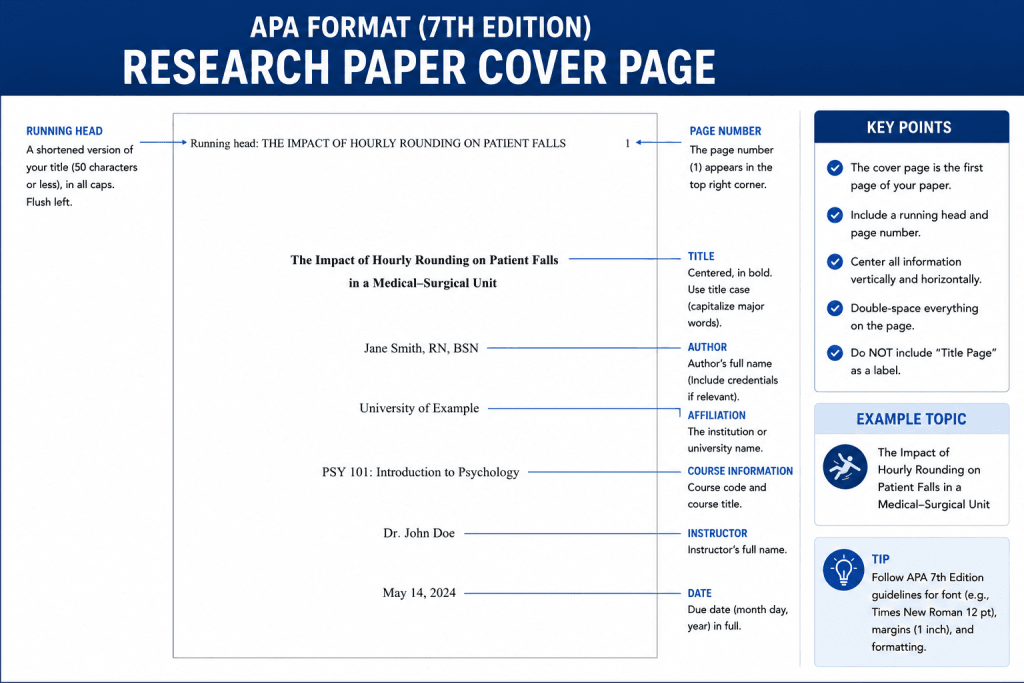
- The APA title page is divided into two types: student papers and professional papers. For a student paper, you’ll need the paper title, author name, affiliation (school or department), course number and name, instructor name, and assignment due date.
- The main title should be bolded, centered, and positioned in the upper half of the page, typically about one-third of the way down.
- Use title case for the title — meaning major words are capitalized — and avoid abbreviations. If your paper has a subtitle, place it directly beneath the main title, separated by a colon.
- A page number appears in the top right corner of every page, including the cover page itself.
- Unlike older APA editions, the running head is no longer required for student papers, though professional papers still need one — so check with your instructor or institution first.
- Font-wise, APA recommends Times New Roman 12pt, though other accessible fonts like Calibri 11pt are also acceptable, as long as it’s used consistently throughout, including on the cover page.
MLA Format (9th Edition)
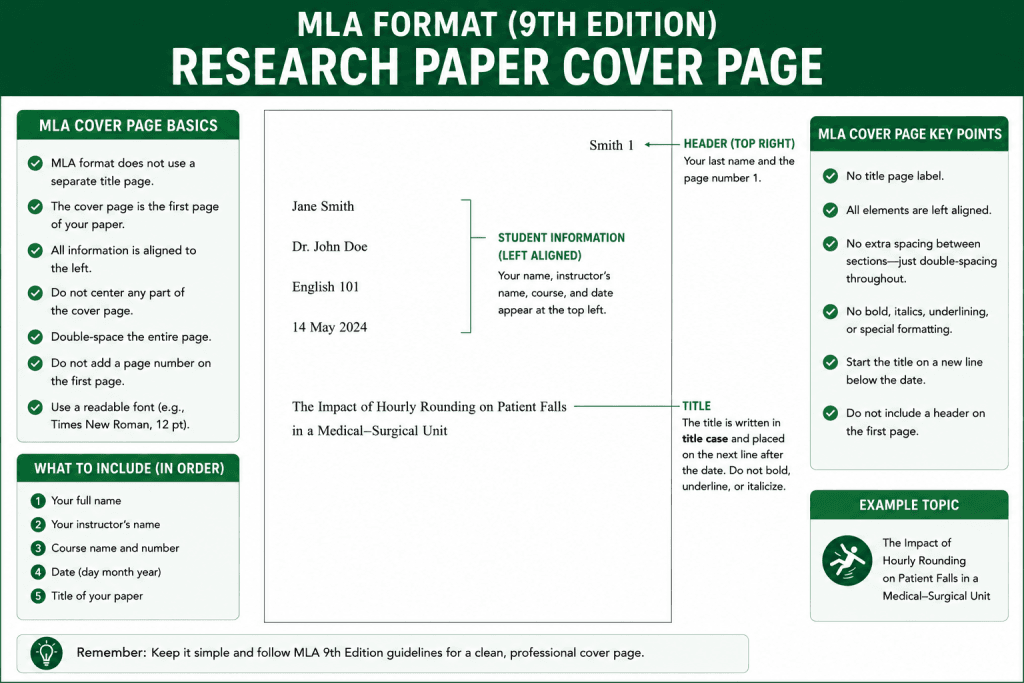
- MLA is more minimalist than APA and often omits a separate title page altogether. Instead, students typically place their name, instructor’s name, course name, and submission date in the left margin of the first page, above the title.
- If your instructor specifically requests a standalone cover page, MLA style suggests centering the paper title, your name, course information, and date roughly at the vertical center of the page.
- All text should remain in double-spaced lines, with a readable font like Times New Roman 12pt, and no bold, italics, or underlining used on the title unless referencing another work.
- Since MLA doesn’t require a running head in the same way as APA, simply include your last name and page number in the top right corner header of each page.
Harvard Format
- The Harvard style cover page tends to be more flexible, but generally includes the paper title, student name, student ID (if applicable), course name, instructor name, and submission date.
- Like APA, the title should be concise, centered, and easy to read at a glance — avoid overly long or wordy titles that dilute your main title’s impact.
- Some Harvard-style institutions request a reference to the department or faculty on the cover page, so it’s worth double-checking your specific institutional guide.
- Regardless of style, always confirm your formatting against your school’s specific handbook, since professors sometimes modify standard style rules to fit their own specific guidelines.
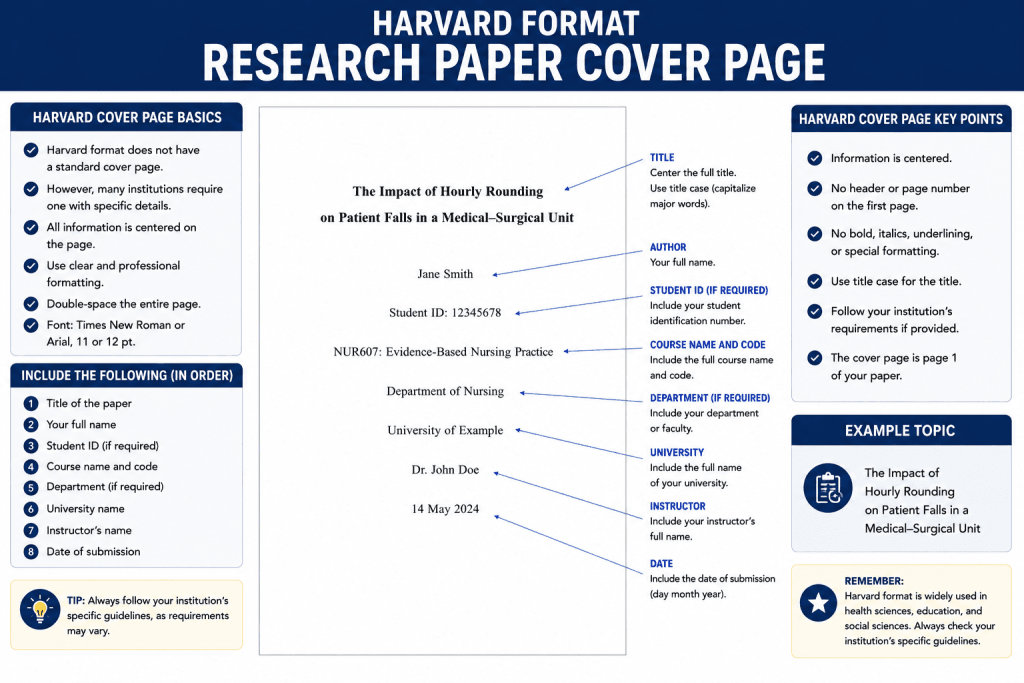
Understanding these differences ensures your research paper cover page always meets academic standards, no matter which citation style your course requires.
Free Research Paper Cover Page Templates You Can Download and Edit
- If formatting from scratch feels overwhelming, free research paper cover page templates are a fast, reliable solution. These templates are pre-formatted according to APA, MLA, or Harvard style, so you don’t have to measure margins or guess font sizes yourself.
- Most template libraries offer a research paper cover page template in multiple file formats — including PDF, Word, and even PNG — so you can choose whichever works best for your submission requirements.
- These page templates are fully customizable and printable, meaning you can adjust colors, fonts, and layout while keeping the required academic structure intact. Whether you need a plain black-and-white cover page or something with subtle design accents, there’s a template for every preference.
- Many platforms let you simply drag and drop your logo, title, or institution details directly into the template, cutting editing time down to just a few minutes.
- Downloading a ready-made cover page template also reduces the risk of formatting errors — no more forgetting the page number placement or the correct font.
- Better still, many of these research paper cover page templates are free, so you can experiment with a few different designs before settling on the one that best represents your paper’s tone and subject matter.
- Whether you’re a first-year student or a seasoned researcher, using a pre-built template for your research paper cover page saves time while guaranteeing a well-designed, submission-ready result.
How to Create a Professional Research Paper Cover Page in Minutes
Creating a professional research paper cover page doesn’t have to take hours. With the right approach — and a few expert tips — you can have a polished, submission-ready page in just minutes.
- Start with a template instead of a blank page. Rather than manually setting margins and fonts, open a pre-formatted research paper cover page template that already follows APA, MLA, or Harvard guidelines. This removes the guesswork and ensures your format is correct from the very first click.
- Confirm your required elements first. Before typing anything, check your assignment sheet or instructor’s guidelines to see exactly what needs to appear — paper title, author name, course number and name, instructor name, and due date are the most common. Some instructors also want a student ID or department affiliation, so don’t skip this step.
- Center and bold your main title. Your paper title should be the visual anchor of the page. Use title case, keep it concise, and make sure it accurately reflects your paper’s core argument. If there’s a subtitle, add a colon and place it directly below the main title in a slightly smaller or non-bolded font.
- Add your details in the correct order. Beneath the title, list your name, course name and course number, instructor name, and submission date. Keep consistent spacing between each — most templates already have this built in, so you simply fill in the blanks.
- Set the correct font and spacing. Stick to Times New Roman 12pt (or another accessible academic font) and make sure the page follows double-spaced lines, matching the rest of your document.
- Insert the page number correctly. Place your page number in the top right corner header, and if required by your style guide, include a running head or your last name alongside it.
- Proofread every detail. Typos on a cover page are especially noticeable since there’s so little text — double-check spelling of your instructor’s name, course title, and your own name before finalizing.
- Export in the right file type. Save your finished cover page as a PDF if your professor wants a polished, non-editable submission copy, or keep it as an editable Word document if further changes might be needed.
- Use design restraint. A well-designed research paper cover page doesn’t need flashy colors or graphics — clean lines, appropriate white space, and correct alignment often convey more professionalism than decoration ever could.
- Double-check against your rubric. Before submitting, compare your finished page against your course’s specific guidelines one final time to confirm it meets academic standards.
Following these steps consistently will help you produce a professional-looking research paper cover page every time, regardless of subject or citation style — and with practice, the whole process truly does take just minutes.
Upload Your Details: Customizing Your Title Page Template Step by Step
Once you’ve picked a template you like, personalizing it is simple. Here’s a step-by-step guide to customizing your research paper cover page in five easy steps.
Step 1: Choose and Open Your Template
- Browse the available research paper cover page templates and select the one that matches your required format — APA, MLA, or Harvard.
- Open the template in your editor of choice. Many platforms allow you to preview the cover page design before committing, so take a moment to make sure the layout suits your paper’s tone.
Step 2: Upload Your Institution’s Logo or Branding (Optional)
- If your school or department requires a logo on the title page for research, use the upload feature to add your image file directly onto the template.
- Most editors support a simple drag and drop function — just pull your logo file (JPEG, PNG, or similar) onto the placeholder area, resize it if necessary, and it will snap into place.
- If a logo isn’t required, skip this step and move straight to adding your text details.
Step 3: Fill in the Main Title and Subtitle
- Click into the main title text box and type your paper title in title case. Keep it concise yet descriptive enough to reflect your research focus.
- If you have a subtitle, add a colon after the main title and type it in below, usually in a smaller font size to maintain visual hierarchy.
- Review the header area to ensure the title doesn’t overlap with any margin guides or page number placeholders.
Step 4: Add Author, Course, and Instructor Information
- Beneath the title, enter your author name, course number and name, name of the instructor, and submission date or assignment due date.
- If your format requires an affiliation (school, department, or institution), include that as well — this is common for APA student papers.
- Double-check spacing between each line; most templates are pre-set with the correct spacing, so you’ll mostly just be replacing placeholder text with your own details.
Step 5: Review, Refine, and Export
- Look over the entire cover page one more time, checking font consistency (usually Times New Roman), alignment, and that the page number appears correctly in the top right corner.
- Refine any details that look off — perhaps the title needs to be shortened, or the spacing between your name and course information needs adjusting.
- Once you’re satisfied, export your research paper cover page as a PDF for final submission, or save it as an editable file if you anticipate further changes.
- If you want to explore variations before finalizing, browse a few more research paper cover page templates to get inspired by different layouts and styles.
Following this simple five-step process ensures your title page is accurate, professional-looking, and ready for submission without any guesswork.
Best Research Paper Cover Page Templates for Every Academic Style
- APA-Style Templates: These research paper cover page templates are ideal for psychology, education, and social science courses. They typically feature a centered main title, author name, affiliation, course number and name, instructor name, and due date, with a page number in the top right corner — perfect for student papers following the latest APA edition.
- MLA-Style Templates: Designed for humanities and literature courses, these templates favor a minimalist cover page or a left-aligned header block with your name, instructor, course name, and submission date, followed by a centered paper title in double-spaced lines.
- Harvard-Style Templates: These often include additional fields like student ID or departmental reference, making them a great fit for business, law, and science-related coursework that requires more institutional detail on the title page.
- Minimalist Templates: For students who prefer simplicity, minimalist research paper cover page templates strip away unnecessary design elements, focusing purely on clean typography, ample white space, and precise alignment — a safe choice that always meets academic standards.
- Modern Design Templates: These incorporate subtle color accents, geometric lines, or light shading around the header while still keeping all required academic elements intact, giving your cover page a bit of visual personality without sacrificing professionalism.
- Editable Digital Templates: Available in Word, PDF, and PNG formats, these customizable options let you adjust fonts, colors, and spacing freely — ideal for students submitting work digitally or printing a physical copy.
- No matter which design you choose, the goal remains the same: a research paper cover page that’s accurate, well-organized, and tailored to your course’s required format. Take time to get inspired by a few options, then select the template that best represents your paper’s subject and your own attention to detail — because this page is the first impression your reader will have of your work.
- George Mason University Writing Center – Scientific (IMRaD) Research Reports: Overview – https://writingcenter.gmu.edu/writing-resources/imrad/writing-an-imrad-report
- Utah Valley University Writing Center – Scientific Writing: IMRaD – https://www.uvu.edu/writingcenter/handouts/scientific-writing.html
- Brigham Young University Research & Writing Center – Scientific Writing: IMRAD Format – https://rwc.byu.edu/00000188-e4bc-d222-a7ea-eefd769e0000/scientific-writing-imrad-format-pdf