MLA Research Paper Format: Complete Guide with Title Page, Header, and Works Cited Page Templates
- Getting your MLA research paper format right is one of the easiest ways to boost your grade before your instructor even reads a single word of your argument. Formatting is the first impression your paper makes, and when it’s clean and consistent, it signals that you understand academic conventions and respect the MLA handbook guidelines your instructor is grading against.
- This guide walks you through every piece of the MLA research paper format, from the very first page to the last works cited page entry, so you’re not left guessing about margins, fonts, or how to structure your citation correctly.
- Here’s what we’ll cover in this complete breakdown of MLA research paper format:
- Title page vs. header — Most MLA papers skip a separate title page and instead use a simple header on the first page, but some instructors ask for a title page instead, so we’ll show you both.
- MLA style basics — including font, font size, margins, and spacing rules that apply throughout the body of your paper.
- Headings and subheadings — how to organize longer research papers so readers can follow your structure with ease.
- In-text citation rules — how parenthetical citation works, when to use quotation marks, and how to avoid plagiarism.
- Works cited page — the exact template for building an alphabetical list of sources, including a sample MLA entry you can model your own work after.
- Google Docs setup tips, so you can apply MLA style formatting whether you’re working in Microsoft Word or in the cloud.
- Why does this matter so much? Because an MLA research paper isn’t just judged on content. Instructors — and the Purdue OWL®, the most trusted authority on this style — are explicit that consistent MLA research paper format is part of academic writing. A paper using MLA style correctly shows attention to detail, and that consistency carries through every page, every citation, and the works cited page at the end of your paper.
- Some of the most common formatting mistakes students make with MLA research paper format include:
- Using the wrong font (something other than a legible font like Times New Roman or Arial).
- Forgetting to double-space the entire paper, including the works cited page.
- Mislabeling or skipping the MLA header entirely.
- Confusing title case with regular capitalization rules for a paper title.
- Not indenting the first line of each paragraph.
- Placing the last name and page numbers in the wrong spot, instead of the upper right-hand corner.
- Missing italics or quotation marks around titles of sources.
- Forgetting a parenthetical citation after a quote or paraphrase, which can look like plagiarism even if it was accidental.
- The good news is that once you learn the pattern, MLA research paper format becomes second nature. It’s a highly systematic style — every rule has a clear, repeatable answer, whether you’re asking about spacing, indent size, or how to format a works cited entry.
- Throughout this guide, we’ll also give you a sample MLA paper structure you can follow step by step, along with a ready-to-use template so you’re not starting from a blank page. Whether you’re a first-year student writing your first research papers or a senior polishing your thesis, this guide gives you everything you need for formatting papers in MLA research paper format with confidence.
- By the end, you’ll be able to move fluidly between the works cited page and in-text citations, understand exactly how headings and subheadings should look, and know how to set up your first page without second-guessing yourself. Let’s get started with the fundamentals of MLA research paper format.
MLA Research Paper Format Basics: MLA Style, Spacing, and Heading Rules
Before diving into the specifics of headers and works cited entries, it helps to understand the foundational rules of MLA research paper format that apply to every page of a paper using MLA style. These basics are non-negotiable — they apply consistently throughout the paper, not just on the first page.
Font and font size
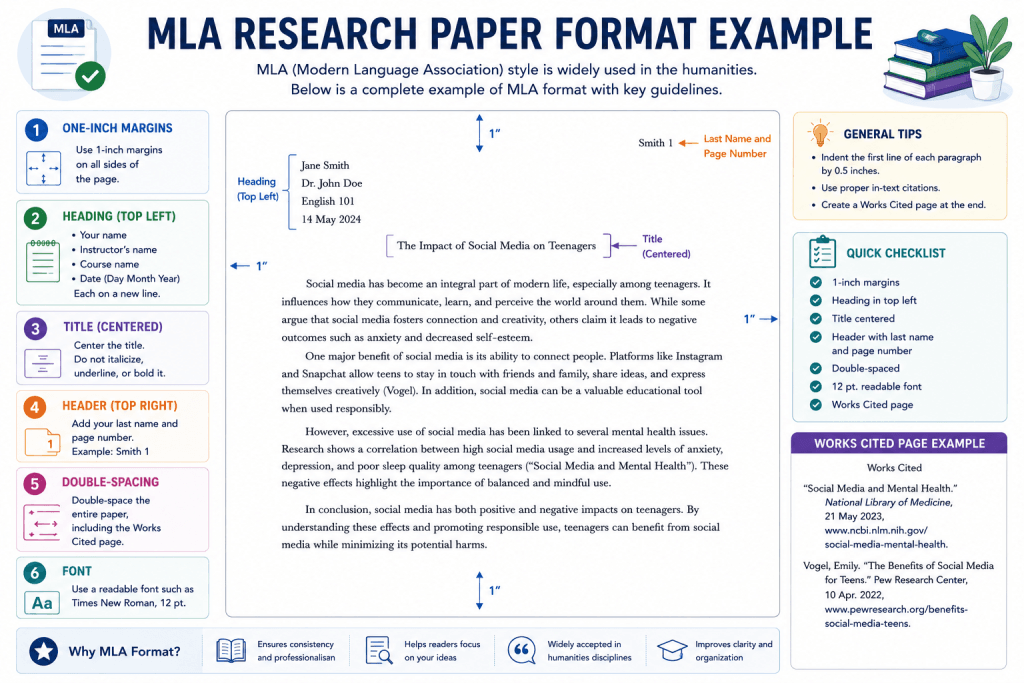
- Use a legible font such as Times New Roman in 12-point font size. This is the standard recommended by the MLA handbook for MLA research paper format.
- Avoid decorative or unusual fonts. While Arial is sometimes accepted, Times New Roman remains the safest default for MLA research paper format.
- Keep the font consistent across the entire document — headers, body text, and the works cited page should all match.
Spacing rules
- The entire paper should be double-spaced, with no extra spacing added between paragraphs.
- This applies to the body of your paper, the works cited page, and even long quotations.
- Do not manually add extra line breaks between headings or paragraphs — MLA research paper format relies on consistent double spacing throughout, not visual gaps.
- In Microsoft Word or Google Docs, set line spacing to 2.0 under paragraph formatting settings rather than pressing enter twice, which creates inconsistent spacing.
Margins
- Set all margins to one inch on every side of the page — top, bottom, left margin, and right margin.
- This is a strict rule of MLA research paper format that keeps pages uniform and easy to read.
Indentation
- Indent the first line of every paragraph by one-half inch.
- Use the tab key or your word processor’s paragraph indent setting rather than pressing the spacebar multiple times, which can cause misalignment.
Page numbers and the header
- Every page needs a running header in the upper right-hand corner, one-half inch from the top of the page.
- This header should include your last name followed by the page number, formatted simply as your last name and a number — no comma, no “p.” or “page.”
- The header should appear flush with the right margin on every page, including the first page and the works cited page.
Titles and capitalization
- Use title case for your paper title — this means capitalizing major words while keeping small words like “and,” “the,” and “of” lowercase, unless they start the title.
- Center the title on the page; do not boldface, underline, or italicize your own paper’s title unless it contains the title of another work within it.
- If your title references another work, such as a novel or film, italicize that portion only, following the same rule you’d use for titles of longer works in your citation entries.
General formatting habits
- Avoid using bold or underline formatting anywhere in the body of your paper unless specifically instructed otherwise.
- Keep punctuation and capitalization clean and consistent, especially in headings, since small errors in MLA research paper format compound across a full-length research paper.
- Save your document with a clear file name, and always double-check formatting after pasting text from another source — pasted text often carries hidden formatting that clashes with proper MLA research paper format.
Mastering these basics means every other part of your MLA research paper format — the header, the title page, the citation style, and the works cited page — will fall into place naturally, because you’re building on a consistent foundation.
First Page Setup in MLA Research Paper Format: Title Page vs. Heading
One of the most common points of confusion in MLA research paper format is whether you need a title page at all.
The standard approach: heading, not a title page
- In most cases, MLA research paper format does not require a separate title page. Instead, the first page includes a simple heading in the upper left margin.
- This heading includes four lines, each on separate lines, double-spaced like the rest of the paper:
- Your full name
- Your instructor’s name
- The course name and number
- The date, written in day-month-year format (e.g., 11 July 2026)
- Directly below this heading, center the title of your paper using title case, with no extra spacing added before the body of your paper begins.
When a separate title page is used
- Some instructors, especially for longer research papers or group projects, request a title page instead of the standard heading.
- If this is the case, follow your instructor’s specific instructions closely, since MLA research paper format itself doesn’t standardize a formal title page layout the way APA does.
- A title page typically includes the paper’s title centered in the middle of the page, with your name, course, instructor’s name, and date listed below it, all double-spaced.
The header still applies
- Regardless of whether you use a title page or the standard heading, the running header with your last name and page number still appears in the upper right-hand corner of every page, one-half inch from the top.
- If you use a title page, check with your instructor on whether page numbering starts on that page or on the first page of actual text.
Quick decision guide
- Default to the four-line heading and centered title unless told otherwise — this is the standard MLA research paper format approach.
- Only use a separate title page if your instructor, assignment sheet, or the MLA handbook edition you’re following explicitly calls for one.
Getting the first page right sets the tone for the rest of your MLA research paper, so take the extra minute to confirm which version your instructor expects.
Headings and Subheadings in MLA Paper Format: Structuring Your Research Papers
Longer research papers often benefit from internal headings and subheadings that help readers navigate your argument. While MLA research paper format doesn’t mandate them for shorter essays, they’re valuable for organizing complex MLA research paper projects.
When to use headings
- Use headings and subheadings when your paper is long enough to have distinct sections, such as an introduction, literature review, methodology, and conclusion.
- Shorter essays typically don’t need internal headings — a strong first page heading and clear paragraph transitions are enough.
Formatting headings correctly
- Headings should be flush with the left margin, not centered, and should not be italicized, boldface, or underlined unless your instructor specifies a particular style.
- Use title case for headings, capitalizing major words the same way you would for your paper title.
- Number your headings if your paper uses a multi-level structure (for example, “1. Introduction,” “2. Literature Review”), keeping the number and a period format consistent throughout.
Subheading hierarchy
- If you need subheadings within a section, keep the formatting distinguishable but simple — for instance, main headings in title case and subheadings in sentence case, still flush with the left margin.
- Avoid overcomplicating the hierarchy; two levels are usually sufficient for most MLA research paper projects.
Consistency matters most
- Whatever heading style you choose, apply it consistently across the entire document.
- Keep spacing around headings the same as the rest of the paper — double-spaced, with no extra blank lines inserted before or after.
Clear headings and subheadings make your research papers easier to follow and show that you’ve thought carefully about structure, which strengthens your paper beyond just correct MLA research paper format mechanics.
In-Text Citation Rules for MLA Format: Avoiding Plagiarism in Your MLA Research Paper
Accurate in-text citation is at the heart of academic integrity. Every time you quote, paraphrase, or summarize someone else’s ideas in your MLA research paper, you need a parenthetical citation to give credit and avoid plagiarism.
The basic parenthetical citation format
- The standard MLA research paper format citation includes the author’s last name and the page number, placed in parenthesis at the end of the sentence: (Smith 45).
- Notice there’s no comma between the last name and the page number, and no “p.” before the number.
- The parenthetical citation goes before the final punctuation mark of the sentence.
Quoting directly
- Any directly quoted material must appear in quotation marks, with the parenthetical citation immediately following.
- For quotations longer than four lines, use a block quote instead: indent the entire quote one inch from the left margin, remove the quotation marks, and place the citation after the final punctuation.
Paraphrasing and summarizing
- Even when you paraphrase instead of quoting directly, you still need a citation — changing the wording doesn’t remove the need to cite your sources.
- This is one of the most common ways plagiarism happens accidentally in research papers, so always double-check paraphrased sentences for a matching in-text citation.
When author names appear in the sentence
- If you mention the author’s name naturally in your sentence, you only need the page number in parenthesis: According to Smith, the results were inconclusive (45).
Multiple sources and no page numbers
- For sources without page numbers, such as many web sources, use just the author’s last name in the parenthetical citation, following standard MLA research paper format rules.
- If a source has no named author, use a shortened version of the title in quotation marks or italics, matching how it appears on the works cited page.
Why this matters for avoiding plagiarism
- The Purdue OWL® and the MLA handbook both emphasize that consistent citation habits, as part of proper MLA research paper format, protect you from unintentional plagiarism.
- Every in-text citation should correspond directly to an entry on your works cited page, creating a clear trail between the works cited page and in-text citations throughout your MLA research paper.
Mastering in-text citation takes practice, but once the pattern clicks, it becomes a quick, almost automatic step every time you reference a source in your research papers.
Works Cited Page for MLA Research Paper Format: Template, Sample MLA Paper, and Google Docs Setup
The works cited page is where every source referenced in your MLA research paper gets a full, detailed entry. It’s the companion to your in-text citations, and together they form the backbone of proper MLA research paper format.
Basic setup for MLA research paper format
- Start the works cited page on a separate page at the end of your paper, with “Works Cited” centered at the top — not in italics, quotation marks, or boldface.
- Continue the same running header with your last name and page number in the upper right-hand corner.
- Keep the entire works cited page double-spaced, matching the rest of the MLA research paper.
Alphabetical order and hanging indent
- List every entry in alphabetical order by the author’s last name, as required by MLA research paper format.
- Use a hanging indent for each entry: the first line sits flush with the left margin, while every subsequent line of that entry is indented one-half inch.
Basic works cited entry template
- A general template for a book, following MLA research paper format, looks like this:
- Last Name, First Name. Title of Book. Publisher, Year.
- For a website:
- Last Name, First Name. “Title of Page.” Title of Website, Publisher, Date, URL.
- Titles of longer works, like books or websites, are italicized, while shorter works, like articles or chapters, go in quotation marks.
Sample MLA paper entry
- A sample MLA citation for a journal article might read:
- Johnson, Maria. “Understanding Climate Policy.” Journal of Environmental Studies, vol. 12, no. 3, 2023, pp. 45-60.
- Reviewing a full sample MLA paper alongside your own draft can help you catch small formatting errors before submission.
Setting this up in Google Docs
- Google Docs has built-in citation tools under the “Tools” menu that can help format works cited entries automatically for correct MLA research paper format, though it’s still worth double-checking against the MLA handbook for accuracy.
- To replicate proper MLA style in Google Docs, set your font to Times New Roman, size 12, set line spacing to double, and set margins to one inch on all sides before you start writing.
Final check before submission
- Confirm every in-text citation has a matching entry on the works cited page, and vice versa.
- Review spacing, indent, capitalization, and italics one more time across the whole document to ensure your MLA research paper format is airtight.
- A polished works cited page is often the last thing an instructor checks, so it’s worth the extra few minutes to get it exactly right.
With your title page or heading, body of your paper, in-text citations, and works cited page all following consistent MLA style rules, your MLA research paper is ready for submission.
- George Mason University Writing Center – Scientific (IMRaD) Research Reports: Overview – https://writingcenter.gmu.edu/writing-resources/imrad/writing-an-imrad-report
- Utah Valley University Writing Center – Scientific Writing: IMRaD – https://www.uvu.edu/writingcenter/handouts/scientific-writing.html
- Brigham Young University Research & Writing Center – Scientific Writing: IMRAD Format – https://rwc.byu.edu/00000188-e4bc-d222-a7ea-eefd769e0000/scientific-writing-imrad-format-pdf